One tower or one tower type? Start with the right badge
One Gun Wonder requires surviving level 1.1 with one tower and no abilities. Specialist requires surviving level 3.1 with one tower type and no abilities. Multiple towers of the same type are a different condition from a single tower.
All six badge descriptions were rechecked against Roblox on October 15. Use their exact level, tower and ability rules to plan the run, then check the actual award afterwards. The planner checks stated conditions; it cannot guarantee a clear or a badge.
The six published conditions
Every row includes surviving the listed level. “Not stated” means the description does not add a rule for that item; it is not a claim that every possible game interaction has been tested.
| Badge | Level | Tower rule | Ability rule |
|---|---|---|---|
| First Stand | 1.1 | No additional rule stated | Not stated |
| One Gun Wonder | 1.1 | A single tower | No abilities |
| Bare Hands | 2.1 | Do not build any tower | Not stated |
| Holding Ground | 3.1 | No additional rule stated | Not stated |
| Specialist | 3.1 | Only one kind of tower | No abilities |
| Fire and Lightning | 4.1 | Only Flamers and Tesla coils | No ability except Cryo beam |





Check a badge plan before the run
Choose a badge, the planned level, and your tower and ability choices for the entire attempt. The checker compares those choices with the published restrictions; it cannot predict survival or confirm an award.
Use the replacement option if you intend to sell or replace a tower. For limited tower types, choose an option that identifies the types; a match never resolves undocumented hero or upgrade interactions.
Uses the six official badge descriptions. Inputs stay on this page and are not saved or sent. Tower upgrades, replacement rules and hero classification are not independently tested.
First Stand and Holding Ground: verify the level and survival
First Stand names level 1.1; Holding Ground names level 3.1. Their descriptions give only the survival objective. Do not import the extra conditions from One Gun Wonder or Specialist simply because those badges use the same levels.
For example, using two tower types at 3.1 conflicts with Specialist’s type restriction, but that restriction is absent from Holding Ground’s text. This is a comparison of the published conditions, not a report that a particular run earned either badge.
One Gun Wonder vs Specialist: tower count versus tower type
Two copies of one type are two towers but one type. Use the comparison below to avoid carrying the single-tower condition into a Specialist attempt.
| Badge | Level | What to count | Ability rule |
|---|---|---|---|
| One Gun Wonder | 1.1 | One tower | No abilities |
| Specialist | 3.1 | One tower type; the description does not impose a one-tower limit | No abilities |
| Bare Hands | 2.1 | No tower built during the run | No additional ability rule stated |
How to get One Gun Wonder: level 1.1, one tower, no abilities
The published requirement combines all three conditions: survive 1.1, use a single tower, and use no abilities. Two towers of the same type still conflict with its single-tower rule. Cryo beam has no exception for this badge.
The level 1.1 beginner walkthrough explains placing and aiming a Sentry, but it is not a verified One Gun Wonder run. The badge record does not identify the best tower, an upgrade requirement or how selling and replacing a tower is counted.
How to get Specialist: level 3.1, one tower type, no abilities
The published objective is to survive 3.1 while using only one kind of tower and no abilities. Several towers of the same kind fit the stated type restriction; mixing two kinds conflicts with it. This interpretation does not establish a winning build.
Holding Ground also uses level 3.1, but its description asks only for survival. Clearing the level for Holding Ground does not establish that the additional Specialist conditions were met.
Bare Hands: does building and selling a tower count?
Bare Hands requires surviving 2.1 without building a tower. Building one and selling it later conflicts with that condition: the rule concerns what you built during the attempt, not whether the field is empty at the end.
Its description does not add an ability prohibition. That absence does not settle undocumented hero interactions or prove a particular no-tower strategy succeeds. Keep the written rule separate from an untested loadout.
Check abilities separately, including the Cryo beam exception
One Gun Wonder and Specialist prohibit abilities. A single use therefore conflicts with their written condition even if the tower plan fits. First Stand, Holding Ground and Bare Hands state no additional ability condition.
Fire and Lightning names Cryo beam as its only ability exception. Using another ability conflicts with that description. The exception permits Cryo beam; the text does not require you to activate it.
| Illustrative ability use | Condition reading |
|---|---|
| No abilities used | Does not conflict with a no-abilities rule. |
| Cryo beam used during One Gun Wonder or Specialist | Conflicts: those two descriptions give no Cryo exception. |
| Only Cryo beam used during Fire and Lightning | Fits its stated ability exception. |
| Cryo beam and another ability used during Fire and Lightning | Conflicts: the other ability is outside the exception. |
Fire and Lightning: use the allowed tower list and ability list together
This badge is tied to level 4.1. Its tower list is Flamers and Tesla coils; its ability exception is Cryo beam. Choosing a tower outside that list conflicts with the requirement even if no ability is used.
The wording does not say that both tower types must be placed. A plan using Flamers only, for example, uses a type within the named list. Likewise, the Cryo exception does not demand an ability activation. These are readings of the description, not tested badge-awarding edge cases.
A no-tower attempt is a separate ambiguity: the wording does not explain whether placing none satisfies an objective described as using those tower types. Do not turn that untested case into a guaranteed success result.
Prepare your objective and recording method before entry
Set up the entry note before starting. Use the checkpoint table below to record what happens during and after the attempt.
- 01
Confirm the chosen objective
Keep the exact badge name, level and current restriction text beside your planned setup.
- 02
Check your starting badge inventory
Note whether this account already holds the badge. That baseline lets you interpret the post-run inventory check.
- 03
Choose a recording method
Prepare a short written log or a recording using your device’s available tools. Keep the level label and action order; the wiki planner does not store them.
Record the attempt at entry, during play and at the result
The planner above compares intended choices with the published wording. It does not save a run log. Keep the following record separately if you want to explain why an actual attempt matched or crossed a condition. A screenshot of the final field cannot show a tower you built and later sold.
| Checkpoint | Record this | What it helps establish |
|---|---|---|
| Before entry | Badge name; exact level; planned tower and ability restrictions; whether the badge is already in your inventory. | Which objective this attempt is testing and whether existing ownership predates the run. |
| During play | Each tower built or replaced, its type, and any ability used. Keep the order and relevant video moments if you are recording. | Whether an earlier action crossed the rule even if its effect later disappeared. |
| At the result | Level label, survival result and any badge notification you observed. | What the game displayed at the end of this particular attempt. |
| After the run | The same Roblox account’s Badges inventory and the exact badge entry, if present. | Whether that account holds the badge; compare with the before-entry check. |
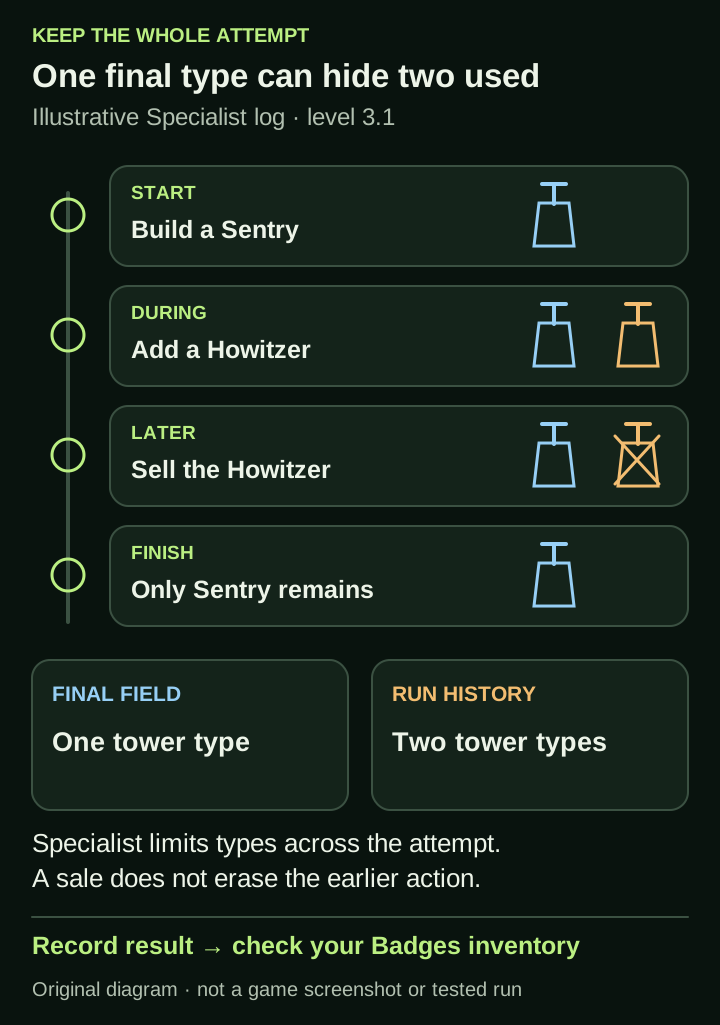
Original illustrative run log, not a game screenshot or a tested badge attempt. Building a second tower type is retained in the history even after that tower is sold.
How to check whether you earned the Roblox badge
Roblox’s official help directs players to the Badges section of their inventory to see earned experience badges. Use the account that played the attempt, open its inventory and choose Badges. Select the matching badge to read its description. Compare the exact name and experience with the reference above.
If you already held the badge before playing, seeing it afterwards cannot show that the latest strategy earned it. Keep that baseline in your notes. If you cannot find the badge, record that observation with the run details; it does not by itself identify a hidden rule or prove a game bug.
Illustrative Specialist record: start 3.1 with a Sentry; add a Howitzer; later sell the Howitzer; finish with a Sentry remaining. The final field shows one type, but the history contains two. Selling the second type does not remove the earlier conflict with the written one-type condition. This example explains how to read a log, not how the game implements every edge case.
For an unresolved attempt, keep the level, objective, short action history, result and inventory observation together. That is more useful for a developer report than “the checker said yes.” Use the creator-linked route below for an in-game issue, or the wiki contact page if our wording needs correction.
Why did a badge not unlock after surviving the level?
First verify the level label and the survival result. Then check whether the game or Roblox shows the badge as awarded to your account. An on-site condition check can organize your inputs; it cannot read the actual run, your account or the game’s award decision.
| What you observe | What to review next |
|---|---|
| The level was not survived | Survival is part of every listed badge. A valid tower plan alone does not satisfy that objective. |
| You survived, but used a disallowed tower or ability | Review the specific condition that was crossed; surviving the level does not remove a restriction. |
| Your written plan looks valid, but the badge is not shown | Compare the actual actions with the plan, verify the level and account, and note any undocumented interaction. Do not assume a guaranteed award or diagnose a game bug from the plan alone. |
| The badge is shown as awarded | Record which badge and level were involved. That observation does not establish how different upgrades, heroes or replacements would be treated. |
Recognize the cases the short descriptions do not settle
The listings do not define whether a sold-and-replaced tower is counted as one or several for One Gun Wonder, whether an upgrade changes a tower’s type for Specialist, or how a hero’s actions interact with tower and ability checks. A final tower count cannot resolve that history.
Where an input crosses an explicit rule, it can be flagged as a mismatch. Where the result depends on one of these unstated details, the useful output is that the description does not settle it. “No rule stated” and “the game has verified this is allowed” are different conclusions.
These are level badges, not a Challenges-mode schedule
The badge records attach their objectives to 1.1, 2.1, 3.1 and 4.1. The developer separately lists Challenges, Endless mode and leaderboards as features. The badge descriptions do not establish a rotation, scoring table or reward rule for those modes.
A badge shows zero recent awards: is it disabled?
Zero recent awards and a disabled badge are different fields. In the official snapshot checked November 9 at 05:28 UTC, all six Horde Defenders badges were enabled. Four of them nevertheless had a past-day award count of zero. That combination is a reason to inspect the status and the count separately, not evidence that the objective has been removed.
The counts below are a dated Roblox API snapshot. They can change after this check, and the past-day field is not presented here as a Beijing-calendar-day total. First Stand and Holding Ground had recent awards; the four restricted objectives did not. Their published level, tower and ability conditions were unchanged.
Do not divide a badge’s awards by another badge’s awards to estimate your success probability. The records do not provide the number of eligible attempts at each objective, the loadouts used or the players who tried. For example, 1,472 lifetime One Gun Wonder awards divided by 365,691 First Stand awards would compare two accumulated counters, not measure how often a one-tower attempt succeeds.
When diagnosing your own missing award, use the attempt record and your account’s badge inventory. The global count does not decide whether your actions met the rules. If the inventory already contained the badge before the run, its presence afterwards also cannot validate a new strategy.
| Badge | Enabled in snapshot | Past-day awards | Total awards |
|---|---|---|---|
| First Stand | Yes | 150 | 365,691 |
| Holding Ground | Yes | 11 | 190,395 |
| One Gun Wonder | Yes | 0 | 1,472 |
| Bare Hands | Yes | 0 | 399 |
| Specialist | Yes | 0 | 6,734 |
| Fire and Lightning | Yes | 0 | 1,541 |
Crossed a badge rule mid-run? Give the rest of the attempt a clear purpose
When an action crosses an explicit badge restriction, keep that fact in the run record. You can still choose a useful purpose for the rest of an ordinary attempt without relabelling it as evidence for the original restricted objective.
For example, a Level 1.1 attempt planned for One Gun Wonder might accidentally use an ability. That action conflicts with its no-abilities wording. Continuing to practise the aim or observe the final survival result can still answer a gameplay question. First Stand has a survival-only description, but any actual award must be checked separately; this comparison does not promise that a particular run will earn it.
At 3.1, adding a second tower type changes the same distinction for Specialist. If you continue, label the record as an unrestricted survival or practice attempt from that point, while retaining the earlier action. Selling the second type cannot erase it from the history. A later clean attempt needs its own entry note.
For an undocumented interaction, avoid declaring either a failure or a successful exception in advance. Record what happened and check the result and badge inventory. The fresh November 12 records retain the same six published conditions; they still do not explain every hero, upgrade or replacement edge case.
| What changed | How to label the evidence |
|---|---|
| An explicit rule was crossed | Record the conflicting action; the rest can document a separate survival or practice question |
| The effect of an action is not documented | Mark the interaction unresolved and retain the observed outcome |
| A later attempt starts with the intended restrictions | Use a new run record instead of merging it with the earlier attempt |
Sources & limitations
Source dates are listed below. Developer descriptions can change during Alpha. These reference notes are not a report of an independent playtest.
- Horde Defenders — official Roblox experience Checked 2026-10-01. Live game record for place 93237333081860 / universe 10766114988: developer, manual aiming, elevation, named heroes, campaign scope and advertised modes. The earlier refund notice is now absent.
- First Stand — official Roblox badge Checked 2026-10-12. Survive level 1.1.
- One Gun Wonder — official Roblox badge Checked 2026-10-12. Survive level 1.1 with a single tower and no abilities.
- Bare Hands — official Roblox badge Checked 2026-10-12. Survive level 2.1 without building a single tower.
- Holding Ground — official Roblox badge Checked 2026-10-12. Survive level 3.1.
- Specialist — official Roblox badge Checked 2026-10-12. Survive level 3.1 with only one kind of tower and no abilities.
- Fire and Lightning — official Roblox badge Checked 2026-10-12. Survive level 4.1 with only Flamers and Tesla coils, and no ability but the Cryo beam
- Horde Defenders — official game records, September 30 Checked 2026-09-30. Current game description: manual aim, elevated range and damage, named heroes, 18 towers, 59 levels across five worlds, modes and Workshop.
- Horde Defenders — official badges records, September 30 Checked 2026-09-30. Six enabled badge records, their named levels, tower restrictions and ability conditions. These descriptions do not expose hidden award logic.
- Horde Defenders — official badges records, October 12 Checked 2026-10-12. Six enabled official badge records rechecked, including One Gun Wonder, Specialist and Bare Hands. The level, tower and ability conditions do not expose hidden award logic or establish a winning run.
- Horde Defenders — official game records, October 15 Checked 2026-10-15. Official identity, advertised content and game metadata rechecked. The description and metadata are unchanged from October 14; latest returned game update remains October 6. The timestamp alone is not a changelog.
- Horde Defenders — official badge records, October 15 Checked 2026-10-15. Six enabled badges; level, tower and ability restrictions are unchanged from October 14. Public descriptions do not expose hidden award checks or establish a winning build.
- Roblox Support — finding earned experience badges Checked 2026-10-15. Roblox directs players to the Badges section of their own inventory to view earned experience badges, then select a badge to read its description. This does not establish that a particular Horde Defenders run earned a badge.
- Horde Defenders — official badge status and award counts checked November 9 Checked 2026-11-09. Six badge records remain enabled with the same descriptions. Snapshot at 05:28 UTC: First Stand 150 past-day/365691 total; Holding Ground 11/190395; One Gun Wonder 0/1472; Bare Hands 0/399; Specialist 0/6734; Fire and Lightning 0/1541. These dynamic award counts do not establish attempt counts, personal odds or a badge bug.
- Horde Defenders — official badge conditions, November 12 Checked 2026-11-12. Direct request returned HTTP 200 at 08:47:32 UTC. Six badges remain enabled with unchanged level, tower and ability conditions. The records do not classify every hero action, upgrade or replacement interaction.