How to get Scrap in Horde Defenders
Battles are a documented source of Scrap. The official VIP description, rechecked on October 12, adds 20% to battle Scrap; it does not say that VIP is required to earn the base reward. Some codes also awarded Scrap in the September 30 recording linked below, but their current redemption status remains untested.
The recorded Tech Tree spends Scrap on upgrades. Keep the reward you earn, the balance you hold and the next node price separate: a node showing 1/5 counts purchases in that node, not your Scrap balance or the number of towers on the field.
| Question | Supported answer |
|---|---|
| Can battles give Scrap? | Yes. The official VIP offer explicitly describes a bonus to Scrap earned from battles. It does not publish each level’s base payout. |
| Can codes give Scrap? | Five code results were recorded historically, including Scrap rewards. Check the dated results and current status on the Codes page before relying on a code. |
| What is Scrap used for? | The recorded Sentry and Howitzer Tech Tree panels show Scrap costs for node purchases. Those examples do not establish every use of Scrap. |
| What is the fastest Scrap farm? | No timed, repeatable farming comparison has been verified for this wiki. There is no supported best level or Scrap-per-minute figure here. |
Which system does each upgrade or bonus affect?
Horde Defenders uses several different progression terms. Drone Hive has upgrades for that tower; Renown Boost changes a rebirth reward; VIP changes scrap earned from battles; and Luck concerns tower skins from crates. A bonus to one of these does not establish a bonus to the others.
The table separates the affected object from the event that produces a reward. The official pass descriptions were rechecked on October 12, 2026; the dated gameplay examples below remain historical recordings.
| Feature | Where it applies | Published effect |
|---|---|---|
| Drone Hive upgrades | The Drone Hive tower | More drones, improved damage and fire rate, and a wider patrol area. |
| Renown Boost | Renown earned when rebirthing | 25% more Renown for each rebirth. |
| VIP resource bonus | Scrap earned from battles | 20% more battle scrap; the pass also includes a chat tag and Sovereign tower skin. |
| +25% Luck | Tower skins obtained from crates | Rarer tower skins occur 25% more often. |
| Vanguard Hero access | Hero availability across saves | The Vanguard unlock applies to every save slot. |
Read an upgrade label in four steps
Use this editorial checklist when you compare options in the current interface. It helps separate an improvement to one tower from a reward or access benefit.
- 01
Name the affected object
Write down what changes: the Drone Hive tower, rebirth Renown, battle scrap, crate skin rewards or hero access.
- 02
Identify when it applies
A battle reward and a rebirth reward happen at different events. Check that the advertised trigger matches the activity you intend to play.
- 03
Read the exact change
Separate an added drone, a wider patrol, a percentage reward bonus and an unlock. A wider patrol does not state the same effect as a damage upgrade.
- 04
Check the live cost and prerequisites
Read the current interface before spending. These public descriptions do not supply a full node-cost table, upgrade order or general refund guarantee.
Worked comparison
If your question is how much Renown a rebirth earns, use the Renown description and the reward calculator. Drone Hive’s wider patrol addresses tower coverage, so it does not answer that reward question.
Desktop Tech Tree controls: inspect the tooltip before clicking
The bottom-left instruction in the recorded desktop tree is specific: drag to pan, use the wheel to zoom, and click a node to buy. That makes a purchase node different from an ordinary information tab. Read the tooltip first instead of clicking an affordable node simply to find out what it does.
At 1:26, the pointer is over Sentry Rate of Fire I and its tooltip shows +0.48 shots per second, 0/10 and a one-Scrap cost while the balance remains 2. The next reviewed frame shows Firepower I at 1/5 and a balance of 1. The visible description, purchase counter and price are the details to inspect before committing.
Use the following sequence when your desktop interface shows the same controls. Move around the tree by dragging empty space, zoom until the label is readable, move the pointer over the intended node and read its effect and current price, then click only when you intend to buy. Recheck the counter and balance afterward. Phone gestures and the effect of Reset Tree are not established by this desktop scene.
| Recorded control | Purpose | Before using it |
|---|---|---|
| Drag | Pan around the tree | Begin in empty space so you can distinguish movement from a node action. |
| Mouse wheel | Zoom the tree | Make the node name and tooltip readable. |
| Pointer over a node | Read its visible tooltip | Match the effect, counter and resource cost to your intended purchase. |
| Click a purchase node | Buy, according to the on-screen instruction | Confirm the current price and balance first. |
Tech Tree example: what does 0/5 → 1/5 mean?
At 1:26–1:28 in Random Roblox Games R US’s September 28 recording, Sentry Firepower I moves from 0/5 to 1/5 after a purchase. Read its three pieces of information separately:
The video was reviewed on October 3 and predates the September 29 game update. Use it to understand the panel; take today’s price and prerequisites from your live tree.
| Panel detail | What it tells you |
|---|---|
| 0/5 → 1/5 | One purchase has been made in this node, out of five shown. This is not the number of towers placed. |
| +0.16 damage per bullet | The effect described by Firepower I; other nodes change firing rate or placement allowance. |
| 1 scrap → 3 scrap | The displayed cost changes after the purchase. Five purchases cannot be budgeted as five times the first price. |
Howitzer example: the next upgrade price changes
The same September 28 recording shows three Blast Radius states. We reviewed the later two frames on October 5. The price displayed beside a node is the next purchase cost at that recorded state; it is not a flat price for all ten purchases.
| Video time | Blast Radius counter | Displayed next cost |
|---|---|---|
| 14:12 | 0/10 | 28 scrap |
| 14:18 | 1/10 | 45 scrap |
| 14:20 | 2/10 | 72 scrap |
Use the price on your current node
These are three observed panel states, not a formula for the remaining prices or a current-build guarantee. The counter does not reveal the total damage of the tower.
Make a budget from the next price, one purchase at a time
Suppose you want to compare several Blast Radius purchases. Begin with the three recorded prices above, not ten copies of the first price. The first two listed purchases total 28 + 45 = 73 Scrap. Including the next displayed price gives 73 + 72 = 145 Scrap. The second total is a plan using a visible next price; it is not evidence that the player bought a third rank in the reviewed scenes.
These sums describe the September 28 example. They exclude any unlock cost and any spending on other nodes. They also do not predict the remaining seven prices. Before using the same calculation in your game, replace every price with the one shown on your current node.
A practical budget needs a starting balance as well as prices. With a hypothetical 100 Scrap, the recorded first two prices would leave 27. That is 45 short of the displayed 72-Scrap next purchase. This is arithmetic for a chosen example balance, not the creator’s observed balance, an earnings estimate or a recommendation to buy this branch first.
| Record in your budget | Why it matters | Example from the recording |
|---|---|---|
| Exact node and before-purchase counter | Keeps another branch’s price out of the calculation. | Howitzer Blast Radius at 0/10. |
| Current next price and resource | Separates what this purchase costs from what your balance contains. | 28 Scrap before the first purchase. |
| Counter and next price after purchase | Starts the next decision from the new state. | 1/10 shows 45 Scrap; 2/10 shows 72 Scrap. |
| Running total and remaining balance | Shows what the chosen sequence costs without guessing later ranks. | 28 + 45 = 73; add the visible next 72 only if planning that purchase. |
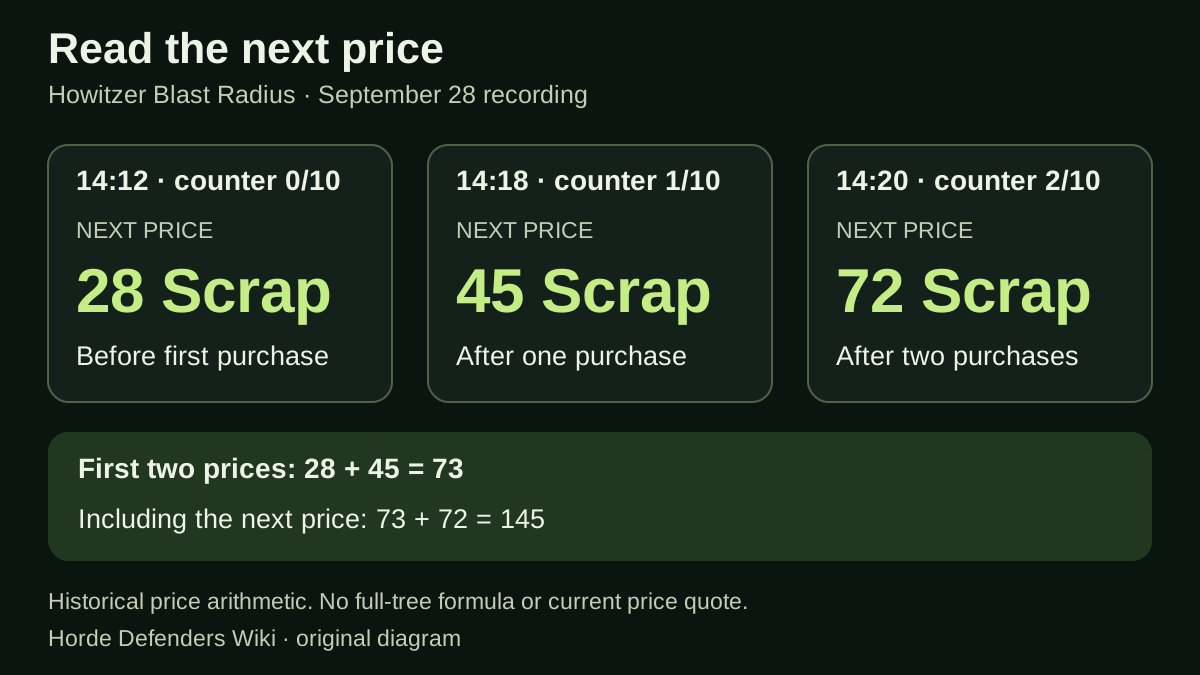
Original diagram of the three historical Blast Radius price states. The 145-Scrap total includes the next displayed purchase; it does not claim a third purchase was observed or quote today’s prices.
Upgrade budget calculator: can you buy the whole plan?
Enter your current Scrap balance and up to three next-purchase prices. The result checks each option alone and then adds the selected prices. Use 0 to leave out an option. All amounts must be whole numbers; this tool does not connect to your Roblox account.
The starting example comes from the recorded Howitzer comparison: 48 Scrap is enough for either displayed 45 Scrap purchase alone. Buying both would cost 90, so the combined plan is 42 short. Leave out either option and the other leaves 3 Scrap. Being able to afford each button separately does not mean you can buy every button.
Use this for one currently displayed purchase per branch. After buying, read the new balance and price before making another plan. A repeated upgrade can cost a different amount, so entering the same current price twice would not establish the cost of buying two levels in that branch. The calculator compares affordability; it does not rank effects or predict the next price.
The starting example uses a historical 48 Scrap balance and two 45 Scrap prices. Replace them with your current screen. Inputs stay on this page.
Keep a small before-and-after purchase record
Random Roblox Games R US video, published September 28, 2026. The first state was reviewed October 3 and the later states October 5. Historical panel evidence, not a current-build price check or an optimal upgrade order.
The YouTube player connects to Google when loaded. Your analytics choice does not control YouTube.
Write one row for one node. A Firepower counter of 0/5 belongs to that node’s purchase allowance; it is not a price, a Scrap balance or a count of towers on the map. A separate Extra Sentry tooltip states the placement-allowance effect. Keeping those fields apart stops a budget entry from silently becoming a build plan.
After a purchase, read the counter and next price again. If the screen shows a different resource, prerequisite or effect, stop that sequence and give it its own row. An incomplete price list can still support a useful next-purchase decision; it cannot establish the cost of completing the whole tree.
- 01
Before buying
Record the date, node name, counter, exact effect, displayed resource and next price. Add your balance if you want to calculate what remains.
- 02
After buying
Record the new counter and price. Check that you are still reading the same node before extending the running total.
- 03
Before planning another purchase
Use the new price and balance. Leave later ranks unpriced until their costs are visible; do not extrapolate a multiplier from three examples.
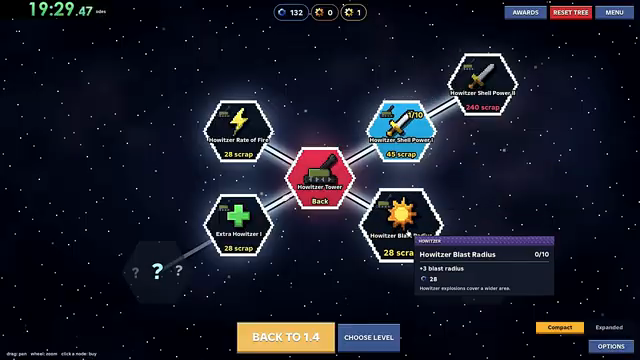
The original 14:12 Blast Radius panel, retained as the first state behind the budget. The two later price states are linked in the recording below.
Drone Hive has a tree for its own tower
The Drone Hive listing describes drones circling the aim point and attacking bugs within that ring. Its four upgrade directions change the number of drones, their damage, their firing rate and the width of their patrol.
That wording identifies a tower-specific tree. It does not establish a shared upgrade for every defense or a Renown cost. For example, the wider-patrol description concerns the area the drones cover; the separately named damage upgrade concerns damage. Keeping those effects separate is more useful than treating every node as the same kind of power increase.
How to get Renown: rebirth rewards versus battle Scrap
Rebirth is a documented source of Renown: the official Renown Boost offer adds 25% to what you receive each time you rebirth. VIP instead adds 20% to Scrap from battles. These are bonuses to different rewards, not an exchange rate or evidence that either pass is required for the base reward.
The separate 50% Money Boost pass still has no detailed standalone description in the October 12 check. Its name is not enough to identify money as Scrap or Renown, or to calculate how it stacks with VIP.
Two separate reward examples
Using 100 as a hypothetical base reward: Renown Boost gives 125 Renown on rebirth, while VIP gives 120 scrap from a battle. These illustrate the published percentages applied separately. They are not observed payouts, a stacking formula or an exchange rate between Renown and scrap.
What does rebirth reset?
The official records checked on October 12 do not list a rebirth threshold, the balances or upgrades it resets, or the items it preserves. The Renown Boost description confirms the reward bonus, not the reset rules. A claim that every tower, all Scrap or every Tech Tree node survives rebirth would go beyond these sources.
Before confirming a rebirth, read the current in-game confirmation and compare its stated losses and retained items with your own save. If that screen leaves something unclear, keep a record and check the developer’s current guidance. This wiki has not performed a current-build rebirth test.
Luck changes skin rewards from crates
The +25% Luck description concerns how often rarer tower skins appear when a crate is opened. It does not advertise more battle scrap, more Renown or stronger tower attacks.
The stated 25% increase is not a published 25% drop chance and does not mean an extra 25 percentage points. Without the starting odds, the listing cannot provide the final chance of a particular skin. It also does not guarantee a rare result from an individual crate.
A pass unlock is separate from an upgrade level
Vanguard Hero explicitly unlocks the hero on every save slot. That is an access promise; it does not say that upgrade levels or progression are shared between those saves. Drone Hive has its own tower offer, and its published description supplies the four upgrade directions above.
The Every Pass Bundle description checked on September 30 explicitly lists Money Boost, speed, Chiller, Luck, VIP, Vanguard, Drone Hive and Renown Boost. The last four were absent from the description checked on September 29. The listing still carries a next-update notice despite being marked for sale. Use the updated list to understand the advertised package, then check its current delivery status separately; the list does not describe how its reward bonuses stack.
What happened to the tech-tree refund notice?
The official game description carried a tech-tree refund warning in the September 27 source check. The live game record checked again on September 29 does not contain it. A search-engine snapshot still showing the warning can therefore reflect the earlier description.
This establishes a change in the public notice, not the refund history of an individual save. The descriptions give no refund amount, list of affected accounts or confirmed start or end date. The earlier tree artwork likewise cannot establish the current node order, costs or prerequisites.
| Observation date | Public description |
|---|---|
| September 27, 2026 | A tech-tree refund warning was present. |
| September 29, 2026 | The current official record no longer contains that warning. |
Plan an unlock and upgrades without mixing their currencies
Keep a separate subtotal for every resource icon. The recorded Howitzer Tower unlock uses bronze; the ordinary upgrade examples use Scrap; Fragmenting Shells uses gold. A Scrap balance that covers several upgrade prices does not establish that the unlock or fragment purchase is affordable.
For a worked historical example, the first two displayed Blast Radius prices add to 73 Scrap: 28 + 45. Adding the recorded unlock and Fragmenting Shells entries produces three requirements — 1 bronze, 73 Scrap and 1 gold — rather than a meaningful single total of 75. This is a shopping-list calculation from separate reviewed panels, not a verified prerequisite chain or recommended build.
Suppose an invented inventory contains 1 bronze, 100 Scrap and no gold. The stated costs fit the bronze and Scrap balances, with 27 Scrap left after those two radius purchases; the gold entry remains unfunded. The extra Scrap does not supply an exchange rate. The public material reviewed here does not establish conversion between these resources.
In your tree, first inspect the unlock and any prerequisites, then record the next price on each chosen node. Compare each subtotal with its matching balance. After a purchase, refresh both the balance and node price before planning another rank. This keeps a rising upgrade cost from disappearing inside an apparently affordable combined plan.
| Historical item | Resource-specific subtotal | What the subtotal leaves out |
|---|---|---|
| Howitzer Tower unlock | 1 bronze | Any unreviewed prerequisite and how bronze is obtained. |
| Two displayed Blast Radius purchases | 28 + 45 = 73 Scrap | Later ranks and all other Scrap purchases. |
| Fragmenting Shells entry | 1 gold | Availability or prerequisite conditions not established by this calculation. |
Keep a reserve for the purchase you actually intend to make
An affordable node can still use the Scrap reserved for a different plan. Name the intended purchase first and subtract its current price from your balance. The remainder is the amount you can spend elsewhere while keeping that plan affordable, assuming the target price and prerequisites remain unchanged.
Use a hypothetical balance of 100 Scrap and a target price of 72 Scrap. That leaves 28 available for another purchase. Spending 28 would preserve exactly 72; spending 45 would leave 55, a shortfall of 17. Spending 56 would leave 44, a shortfall of 28. These are budget examples, not the player’s observed balance or a recommended order.
The example prices come from different reviewed Howitzer states. In particular, 72 is the next Blast Radius price shown at 2/10; it is not the cost of reaching 2/10 from an unpurchased branch. Start from the counter and price currently visible in your own tree. Unlock costs and any other resource requirement belong in separate rows.
After a purchase, read the balance and target node again before treating the reserve as intact. If you change your objective, explicitly release or revise the reserve. This turns “I can buy this button” into the more useful question “Can I buy this and still afford the choice I was saving for?”
| Hypothetical optional spend | Remaining from 100 | Compared with the 72-Scrap target |
|---|---|---|
| 28 | 72 | Target still covered exactly |
| 45 | 55 | 17 short |
| 56 | 44 | 28 short |
Continue with a specific feature
Sources & limitations
Source dates are listed below. Developer descriptions can change during Alpha. These reference notes are not a report of an independent playtest.
- Horde Defenders — official Roblox experience Checked 2026-10-01. Live game record for place 93237333081860 / universe 10766114988: developer, manual aiming, elevation, named heroes, campaign scope and advertised modes. The earlier refund notice is now absent.
- 50% Money Boost — official Roblox pass Checked 2026-10-01. Official listing name and sale status. The listing has no detailed description.
- +25% Luck — official Roblox pass Checked 2026-10-01. Rarer tower skins come up 25% more often from every crate you open, forever.
- Renown Boost — official Roblox pass Checked 2026-10-12. Earn 25% more Renown every time you rebirth.
- Drone Hive — official Roblox pass Checked 2026-10-01. A new tower. Its drones circle the aim point and strafe every bug inside the ring, with its own upgrade tree for more drones, damage, fire rate and a wider patrol.
- Vanguard Hero — official Roblox pass Checked 2026-10-01. Unlock the Vanguard, a heavy rail hero with a shield that shoves the swarm back and an airstrike that carpets the aim line. Yours on every save slot.
- VIP — official Roblox pass Checked 2026-10-12. 20% more scrap from every battle, a VIP tag in chat and the exclusive Sovereign tower skin.
- Every Pass Bundle — official Roblox pass Checked 2026-10-01. Eight named benefits: Money Boost, speed, Chiller, Luck, VIP, Vanguard, Drone Hive and Renown Boost. The listing remains for sale and retains a next-update notice; the description alone does not verify delivery.
- Horde Defenders — official passes records, September 30 Checked 2026-09-30. Ten pass listings. Bundle wording now names eight benefits and retains the next-update notice. Reward and unit descriptions support the comparison; delivery is not independently tested.
- CHALLS — Horde Defenders video guide Checked 2026-10-01. Third-party recording. Reviewed the first 3:21 for the main-menu Codes entry and five visible redemption-result changes. PART1 is only seen entered in that reviewed excerpt. This is recorded UI evidence, not a redemption test by this wiki or a guarantee that a code works now.
- Random Roblox Games R US — recorded tutorial and tower panels Checked 2026-10-03. Selected level 1.1 tutorial, battle-result and Sentry/Howitzer panel scenes. The description links the exact Roblox experience. This recording predates the September 29 game update; it is not an independent current-build playtest, a complete upgrade catalogue or a guaranteed winning build.
- Horde Defenders — official passes records, October 12 Checked 2026-10-12. Official pass descriptions rechecked: VIP increases battle Scrap by 20%; Renown Boost increases rebirth Renown by 25%. These records do not establish farming rates, reset rules or bonus stacking.
- Horde Defenders — official pass records, October 15 Checked 2026-10-15. Ten official pass records, nine for sale. Prices, named benefits and descriptions are unchanged from October 14. The eight-benefit bundle still carries its next-update notice. Public prices are not personalized checkout quotes or proof of delivery.
- Random Roblox Games R US — saved interface frames reread October 19 Checked 2026-10-19. Saved September 28 video frames were reread: target and removal labels at 0:26–0:34; Sentry unlock tooltip at 0:57 and separate branch panels at 1:25–1:28; loss/survival action labels at 0:51, 6:02 and 8:14; Howitzer balance and next-price comparison at 14:15. These are historical interface observations, not an independent playtest or a current-build test.
- Random Roblox Games R US — saved battle and desktop-tree frames reread October 20 Checked 2026-10-20. Saved frames actually viewed on October 20: To spawn / Alive / Killed and base health at 0:18 and 0:48; tutorial Scrap wording at 0:48; LOST reward entries at 0:51; desktop tree controls, Scrap balances and Sentry counters at 1:26, 1:27 and 1:29. This is a historical frame review, not a current game test, full-video review or new reward formula. The same 1:26 and 1:27 tooltips visibly give +0.48 shots per second for Rate of Fire I and +0.16 damage per bullet for Firepower I; the calculator is editorial arithmetic, not measured DPS.