Start with the objective, then choose a defense
Start with the job you need the tower to do: direct bullets at a route, land a blast among a group, or cover a patrol area. For a badge attempt, check its tower and ability restrictions before building.
The developer advertises 18 towers. This reference combines official descriptions with selected Sentry and Howitzer panels from a September 28 recording. The recording predates the game’s September 29 update, so the displayed prices and effects are dated examples; check your live tree before spending.
Four different tasks to inspect before changing towers
Start with a specific observation: bullets are aimed away from the route, a shell is landing outside the group, you want to inspect a possible detour, or a route lies outside a patrol area. Each observation points to a different part of the setup. It does not, by itself, prove that the tower needs more damage or that another tower is stronger.
Use the comparison below to choose the next thing to inspect. Sentry, Howitzer and Barricade descriptions come from dated gameplay panels; Drone Hive’s ring comes from its official pass description, rechecked October 15. This is an editorial comparison of those mechanics, not a recording of the four defenses winning together.
| Question in your run | Mechanic to inspect | What the detailed guide helps you compare |
|---|---|---|
| Sentry fire is pointed away from the route I want covered. | Position and aim point are separate; inspect the direction of the bullet stream. | Firepower, firing frequency and extra placement allowance change different things. |
| Howitzer shells land away from the enemies I want to hit. | Inspect the landing point and blast area before comparing a damage increase. | Shell Power, Blast Radius, Rate of Fire, extra towers and fragments. |
| I want enemies to take a different route. | Read Barricade’s placement conditions and then observe the route in your actual map. | The historical tooltip describes going around a Barricade; it does not verify every proposed detour. |
| The route I want covered lies outside Drone Hive’s patrol. | Compare the aim point, described patrol ring and the route segment. | Patrol width is distinct from drone count, damage and firing rate. |
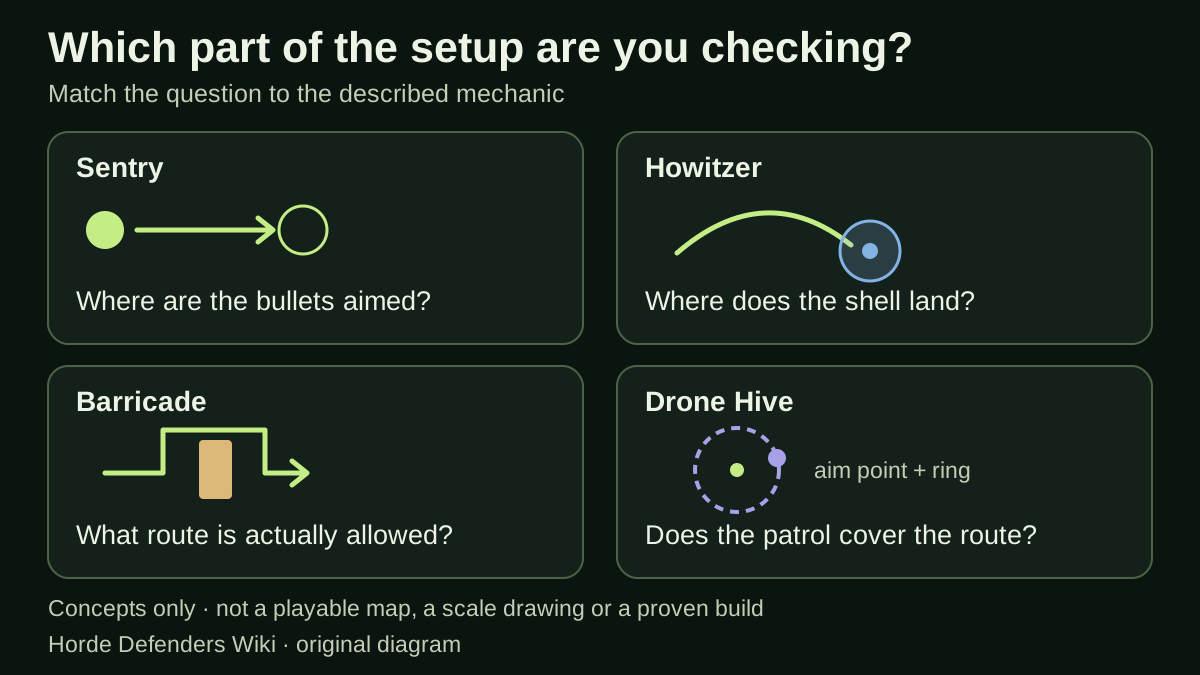
Original diagram: four concepts for choosing a question to investigate. It is not a game map, a placement recommendation, a scale drawing or a demonstration of successful Barricade pathing.
Separate coverage, placement allowance and badge limits
Random Roblox Games R US video, published September 28, 2026. Sentry and Howitzer panels were reviewed October 3; the Barricade frame October 5. Drone Hive is described by its official listing and is not demonstrated by these chapters.
The YouTube player connects to Google when loaded. Your analytics choice does not control YouTube.
Three questions can look similar on a crowded map: where an existing defense acts, how many copies the tree permits, and how many a badge allows. Keep them separate in your notes. Moving Sentry’s target addresses its aim. Buying a recorded Extra Sentry effect increases its placement allowance. Neither action changes the official single-tower condition for One Gun Wonder.
For example, if your chosen task is to examine one Sentry’s bullet direction, first record that tower’s position and aim point. If you instead want a second defended position, check the relevant allowance and the attempt’s restrictions before planning another tower. The first problem does not automatically require an extra placement, and an increased allowance does not automatically make a two-tower badge attempt valid.
When comparing attempts, write the level, goal, defense, position or aim change, and observed outcome. Change one part when practical so that your notes remain interpretable. This is a way to investigate your own setup; it is not a claim that one adjustment is sufficient for every failure or that the recorded node prices still apply.
Sentry: a bullet stream with three different upgrade choices
Sentry is the machine-gun tower introduced in the recorded level 1.1 tutorial. Its description says it fires a rapid stream of bullets toward its aim point. Select the placed tower and drag its target to the path; increasing firepower will not move an off-path target.
The table transcribes the first-tier tooltips in Random Roblox Games R US’s September 28 recording, reviewed on October 3. Each initially costs 1 scrap. After the player buys Firepower I and Extra Sentry I once, those nodes show 3 scrap for their next purchase, so the starting price is not a flat cost for the whole branch.
Read these as three separate decisions: stronger individual bullets, more shots over time, or permission to place another Sentry. Another tower also needs its own position and target. For One Gun Wonder, placing that extra tower would break the official single-tower condition. These are recorded panel values, not a current-build price guarantee or a tested best-first upgrade order.
The small fraction is the node’s purchase count. In this recording, Firepower I changes from 0/5 to 1/5 after one purchase; it does not mean one of five towers has been placed. Extra Sentry I has a separate 0/3 counter and an explicit +1 placeable Sentry effect. Read the fraction together with the tooltip, rather than treating every number as a tower limit.
| Recorded node | Tooltip effect | First purchase |
|---|---|---|
| Sentry Firepower I | +0.16 damage per bullet | 1 scrap |
| Sentry Rate of Fire I | +0.48 shots per second | 1 scrap |
| Extra Sentry I | +1 sentry you can place | 1 scrap |
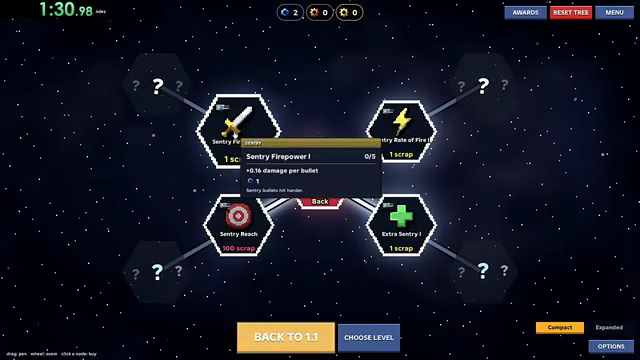
Sentry Firepower I tooltip in Random Roblox Games R US’s recording, about 1:27. Published September 28; reviewed October 3. This is a third-party gameplay frame, not a playtest by this wiki.
How to unlock Howitzer: find the tower node first
The September 28 recording shows a Howitzer Tower unlock node priced at 1 bronze. The later 28-scrap entries are upgrades to Howitzer; their price does not tell you the cost of unlocking the tower.
Open your current Tech Tree and select Howitzer Tower. Read its unlock price and any displayed prerequisite before planning purchases. In the recorded scene, “Back to 1.3” is a navigation button; it is not evidence that beating level 1.3 unlocks Howitzer. The reviewed footage does not establish the complete prerequisite chain or where to obtain the bronze.
Howitzer: choose between blast damage, area and firing frequency
Howitzer lobs shells that explode when they land and damage enemies within the blast. This is a different effect from Sentry’s bullet stream: the useful question is where the shell lands and which enemies are inside the explosion.
Read Shell Power and Blast Radius separately. One increases blast damage; the other expands the affected area. If your target is away from the group you want to hit, reconsider that target before treating the problem as a lack of damage. Rate of Fire changes how often shells arrive, while Extra Howitzer permits another tower to place and aim. Fragmenting Shells adds damaging fragments when a shell bursts.
The values below are visible in Random Roblox Games R US’s September 28 recording, reviewed on October 3. They are first-purchase values from that recorded tree, not a current-build price guarantee or an efficiency ranking. The Blast Radius tooltip does not name a distance unit, so its +3 should not be relabelled as studs or meters.
| Recorded node | Tooltip effect | First purchase |
|---|---|---|
| Howitzer Shell Power I | +1 blast damage | 28 scrap |
| Howitzer Blast Radius | +3 blast radius | 28 scrap |
| Howitzer Rate of Fire | +0.19 shells per second | 28 scrap |
| Extra Howitzer I | +1 howitzer you can place | 28 scrap |
| Fragmenting Shells | +4 fragments per shell | 1 gold |
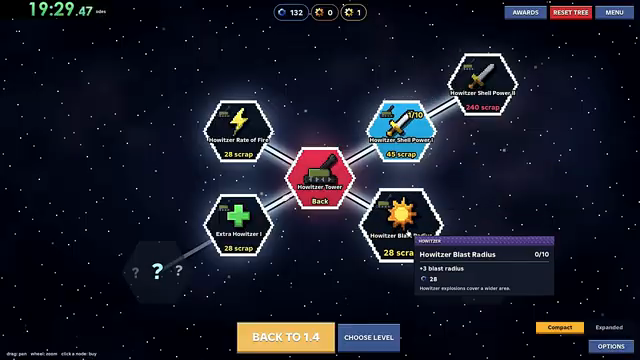
Howitzer Blast Radius tooltip at 14:12.5 in Random Roblox Games R US’s recording. Published September 28; reviewed October 3. The +3 is the panel’s own radius value; this third-party frame is not a playtest by this wiki.
Recorded Barricade tooltip: routing around a placed defense
At 11:54 in Random Roblox Games R US’s September 28 recording, the Barricade tooltip describes a defense built across the path that the horde has to go around. This gives it a different stated role from towers that fire toward an aim point.
The same unlock panel shows 0/1 and a 15-scrap cost. Those are recorded interface values. The tooltip does not demonstrate an actual detour, establish current pricing or prove that every map permits a route to be blocked. Check the current placement rules before planning around it.
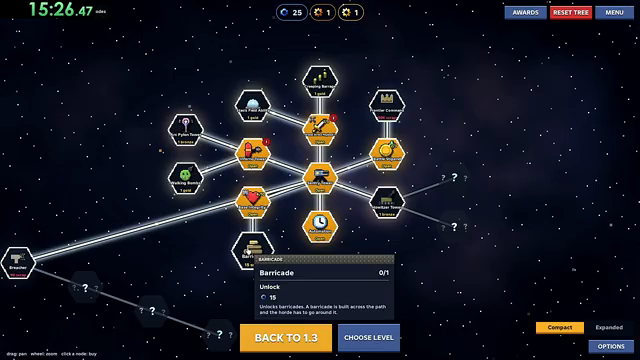
Barricade unlock tooltip at 11:54. Source video published September 28, 2026; archived frame reviewed October 5. This shows the recorded description, not a tested route change.
Look up the defense and the decision it supports
These sources describe different levels of detail. Use the two recorded entries for their specific upgrade panels and the official references for other named defenses.
| Defense | Documented target or effect | What to check before using it |
|---|---|---|
| Sentry / Railgun | The recorded Sentry fires a bullet stream toward its target. Railgun is named by the developer, without individual stats in the reviewed official description. | See the Sentry entry for recorded node effects; those values do not describe Railgun. |
| Howitzer | The recorded unlock panel describes shells that explode on landing and damage enemies in the blast. | Compare blast damage, radius and firing rate separately in the Howitzer entry. |
| Barricade | A September 28 recorded tooltip describes a defense built across the path that the horde must go around. | Read the recorded Barricade entry. The tooltip does not verify a route change on every map. |
| Barbed Wire / Tar Lobbers | Named among the developer’s defenses; individual effects are not described. | Do not infer an exact slowing or placement rule from the name. Neither is named in Fire and Lightning’s permitted tower list. |
| Flamers / Tesla coils | The tower types named in Fire and Lightning’s level 4.1 condition. | These are the permitted names for that badge attempt. The badge does not state their damage mechanics or which is stronger. |
| Drone Hive | Drones patrol around the aim point and attack bugs within the ring; four upgrade directions are named. | Consider the route passing through the patrol area. Drone Hive is not in Fire and Lightning’s permitted list. |
| Chiller | Every Pass Bundle identifies Chiller as a tower; its standalone pass description is empty. | Use the actual item description for its behavior. Do not buy or plan around an inferred freezing effect. |
Separate where you build from where you aim
Placement and aiming solve different problems. The developer states that high ground improves gun range and damage, while tower fire follows the point you aim at. A promising position does not remove the need to direct fire at the incoming route.
Use the sequence below as a way to inspect your defense. These are decisions drawn from the stated mechanics, not a tested map layout.
- 01
Identify the route needing coverage
Look at where the swarm is approaching the defended outpost. Choose that route segment as the task for the defense, rather than choosing a tower solely from its name.
- 02
Compare the placement and aim separately
Consider available elevation for a gun’s position, then direct the aim point toward the part of the route you need covered. Keep a placement problem separate from an aim point that misses the route.
- 03
Observe the effect before changing the plan
For direct gunfire, inspect where shots travel. For Drone Hive, inspect the route relative to the patrol ring. This tells you which part of the setup you are trying to change.
Match a Drone Hive upgrade to the effect you want
Drone Hive’s own upgrade tree names four different changes. The distinction matters because increasing coverage and increasing firing frequency are different tasks.
| Change you are considering | Named upgrade direction | Meaning of the description |
|---|---|---|
| More drones in the patrol | Drone count | Changes how many drones are present. |
| Stronger attacks | Damage | Changes damage, separately from the number of drones. |
| More frequent firing | Fire rate | Changes firing frequency. |
| A broader patrol area | Patrol width | Changes the area around the aim point that the drones patrol. |
Buying access and upgrading a tower are separate choices
The Drone Hive pass describes access to a tower with its own tree. It does not describe a shared upgrade for every tower. Renown Boost, VIP and Luck describe reward bonuses, not Drone Hive node costs.
The four named upgrade directions identify effects, not their size, price or purchase order. For a specific node, use its current in-game wording to distinguish the effect from its cost and prerequisites. The official pass description cannot rank the branches or establish which resource pays for them.
Apply badge rules before comparing tower strength
A tower choice that breaks an achievement condition cannot be repaired by having better damage. Use the required level and the restriction together; the same tower setup can be allowed by one badge description and excluded by another.
| Attempt | Tower decision | Ability decision |
|---|---|---|
| One Gun Wonder · 1.1 | Plan around a single tower. Two copies of the same type still make two towers. | Use no abilities. |
| Bare Hands · 2.1 | Do not build any tower during the attempt. Selling one later does not undo the act of building. | The description states no additional ability rule. |
| Specialist · 3.1 | Keep to one tower type. This is a type restriction, not a stated one-tower limit. | Use no abilities. |
| Fire and Lightning · 4.1 | Only the named Flamers and Tesla coils fit its tower list. | Only Cryo beam is named as an exception; another ability conflicts with the rule. |
Choose a relevant option instead of an unsupported tier
The recorded node values explain what each purchase changes. They do not establish an S-to-D ranking or the most efficient build. Match the effect to the problem you saw, then check the current cost and any badge restriction.
Follow the question you still need to answer
Sources & limitations
Source dates are listed below. Developer descriptions can change during Alpha. These reference notes are not a report of an independent playtest.
- Drone Hive — official Roblox pass Checked 2026-10-01. A new tower. Its drones circle the aim point and strafe every bug inside the ring, with its own upgrade tree for more drones, damage, fire rate and a wider patrol.
- Random Roblox Games R US — recorded tutorial and tower panels Checked 2026-10-03. Selected level 1.1 tutorial, battle-result and Sentry/Howitzer panel scenes. The description links the exact Roblox experience. This recording predates the September 29 game update; it is not an independent current-build playtest, a complete upgrade catalogue or a guaranteed winning build.
- Horde Defenders — official game records, October 3 Checked 2026-10-03. Current official identity, advertised tower count, aiming and elevation wording; no individual tower stat table.
- Horde Defenders — official pass records, October 3 Checked 2026-10-03. Official pass descriptions, including Drone Hive effects and the bundle notice. These records do not establish Sentry or Howitzer node prices.
- Horde Defenders — official badge records, October 3 Checked 2026-10-03. Official level, tower and ability restrictions. Badge descriptions do not expose hidden award logic.
- Horde Defenders — official game records, October 15 Checked 2026-10-15. Official identity, advertised content and game metadata rechecked. The description and metadata are unchanged from October 14; latest returned game update remains October 6. The timestamp alone is not a changelog.
- Horde Defenders — official badge records, October 15 Checked 2026-10-15. Six enabled badges; level, tower and ability restrictions are unchanged from October 14. Public descriptions do not expose hidden award checks or establish a winning build.
- Horde Defenders — official pass records, October 15 Checked 2026-10-15. Ten official pass records, nine for sale. Prices, named benefits and descriptions are unchanged from October 14. The eight-benefit bundle still carries its next-update notice. Public prices are not personalized checkout quotes or proof of delivery.