Read three fields instead of one big reward
A code can list a timed booster and a fixed Scrap amount in the same result. They answer different questions. The fixed amount is the listed resource reward; the timer describes how long a benefit remains; the multiplier describes its displayed scale. Adding more time is not the same operation as increasing the multiplier.
In the reviewed part of CHALLS’s September 30 recording, the active-booster panel says 1.5× Scrap per battle. Later booster results extend the displayed remaining time while that multiplier stays at 1.5×. This guide uses those visible fields to explain how to read a booster, with calculations clearly separated from observed payouts.
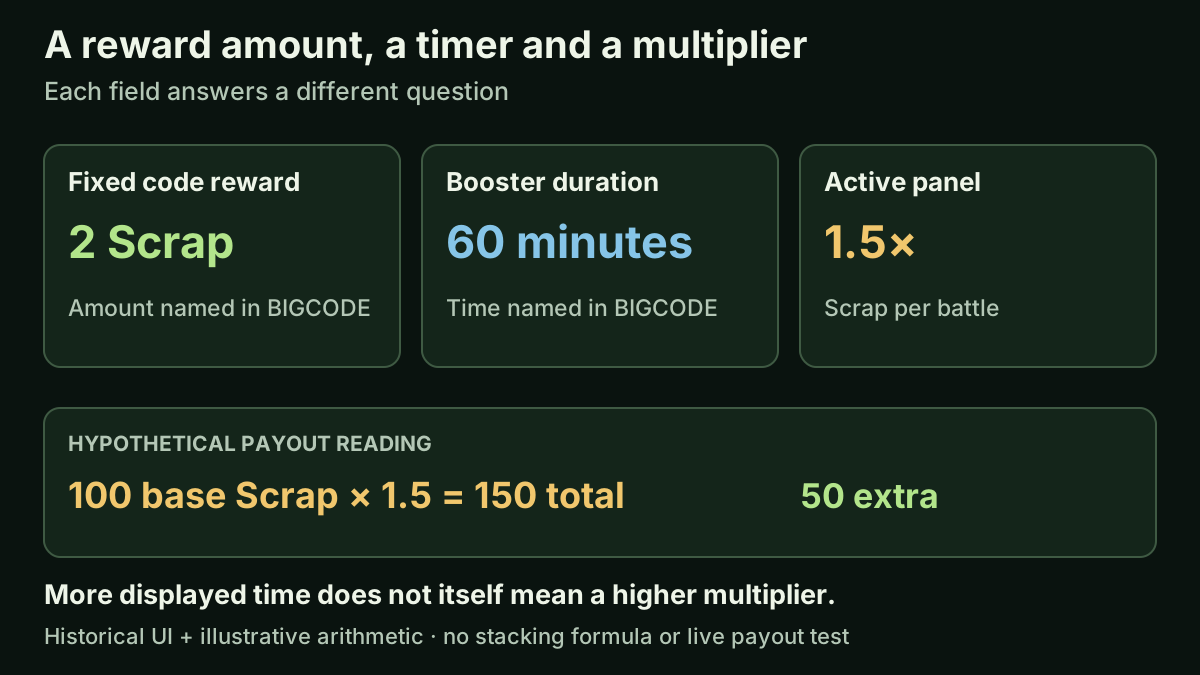
Original explanation of three distinct fields: fixed reward, duration and multiplier. The diagram is not a current game panel or a stacking formula.
What changes in the recorded session?
BIGCODE’s new result at 1:50–1:55 lists a one-hour booster together with 2 Scrap and 2 Gems. The active-booster display becomes visible. GIBILOSTHISSCRAP’s later result lists another one-hour booster; at about 2:26 the remaining timer reads roughly 1:59:24. That is consistent with added time and some elapsed seconds, rather than a second doubling of the displayed multiplier.
IMAGEISAWESOME later lists a 30-minute booster, and LAUNCH lists a one-hour booster. The reviewed panel continues to show 1.5× while the time increases. Follow the before-and-after sequence rather than adding durations from a screenshot containing an older result message.
| Field | Observed reading | What it establishes |
|---|---|---|
| Multiplier | 1.5× Scrap per battle | The displayed rate remains the same through the reviewed later results. |
| Remaining time near 2:26 | Approximately 1:59:24 | The session shows added duration with elapsed time. |
| BIGCODE fixed reward | 2 Scrap and 2 Gems | These named amounts are separate from the one-hour booster. |
Worked example: 1.5× means 50% extra
Take a hypothetical eligible base reward of 100 Scrap. Multiplying by 1.5 gives a total of 150 Scrap: the original 100 plus 50 extra. It does not mean 150 extra Scrap. The example explains the multiplier’s arithmetic; the wiki has not measured a battle payout against this panel.
A duration works differently. In a simplified timer exercise, adding 60 minutes to 40 minutes gives 100 minutes before accounting for elapsed seconds. It does not turn 1.5× into 3×. In your actual session, read the displayed time after the result changes; do not expect the sum to ignore time already spent between submissions.
| Reading exercise | Calculation | Answer |
|---|---|---|
| 100 base Scrap at 1.5× | 100 × 1.5 | 150 total Scrap; 50 extra |
| 40 minutes plus 60 minutes | 40 + 60 | 100 minutes before elapsed time |
| Another duration at unchanged 1.5× | Read the multiplier again | No basis to replace 1.5× with 3× |
Keep fixed rewards separate from battle rewards
The booster wording names Scrap per battle. The recorded BIGCODE message separately names 2 Scrap. That message does not demonstrate the fixed code reward being multiplied, nor does it show Gems receiving the Scrap multiplier. Record the reward types exactly as displayed before making any calculation.
The VIP offer, rechecked on October 15, advertises 20% more battle Scrap. That is another published benefit, but the checked sources do not define how VIP combines with this timed booster. Applying each percentage separately for illustration is possible; choosing an additive or multiplicative stacking formula for the game is not supported by these records.
A short check you can repeat in your own session
- 01
Record the starting display
Note the multiplier and remaining time before using one code. Keep the previous result message in view.
- 02
Identify the new result
Wait for a fresh message after submission. Record fixed Scrap, Gems and duration as separate entries.
- 03
Read both booster fields again
Compare time with time and multiplier with multiplier. Account for seconds passing between the two readings.
- 04
Keep a payout check separate
If you compare a battle result, record the level, reward and other active benefits. A timer change alone does not measure the reward actually paid.
Does booster time run while you are away? Test the timer separately
The reviewed CHALLS footage shows remaining time during an active session. It does not settle whether a booster continues counting down after leaving the game. Do not turn a visible one-hour reward into a promise of one hour of active play, or a promise that it expires one hour after redemption.
You can make the question easier to answer with two timer readings. If a booster is already active, record its exact remaining time and the clock time immediately before leaving. Avoid redeeming another duration between the readings. On returning, record the remaining time as soon as the panel appears, together with the elapsed real time. Keep the account and save consistent so that you are comparing the same situation.
The examples below start from an invented 60:00 display and a 15-minute absence. A return near 45:00 would be consistent with elapsed-time countdown; a return near 60:00, allowing for time spent on the screens, would be consistent with pausing while absent. Neither is a result observed by this wiki. Loading time, display refresh and other changes must be considered before choosing an explanation.
Repeat only when it fits your normal play; there is no need to spend a new code or purchase anything to investigate. Keep a surprising reading as an observation, not an assumed rule. Booster expiry behavior and the 1.5× payout calculation are different questions, and confirming one would not establish the other.
| Invented starting display | Absence | Possible return reading | Interpretation to investigate |
|---|---|---|---|
| 60:00 | 15 minutes | About 45:00 | Consistent with countdown during the absence |
| 60:00 | 15 minutes | Close to 60:00 | Consistent with a paused timer, allowing for active screen time |
| 60:00 | 15 minutes | A different value or no panel | Record it; check expiry, refresh and any intervening changes |
Watch the result changes and booster display
CHALLS recording published September 30, 2026 (UTC); the first 3:21 was reviewed on October 1. These are historical interface observations, not a current redemption or payout test.
The YouTube player connects to Google when loaded. Your analytics choice does not control YouTube.
Use the chapters to inspect the same recorded session. The clip establishes displayed time changes, not current code eligibility. Offline countdown behavior, an upper time limit and interactions with other boosts were not tested in this review. Check the current display rather than assuming those rules from the duration examples.
A booster expires during a battle: which time matters?
If the booster display is active at the start but gone by the result, the timer alone does not tell you how that battle's reward was handled. The historical CHALLS sequence shows duration being added to a 1.5× display; it does not show a battle crossing the expiry boundary or identify when eligibility is decided.
Consider an invented example: 15 seconds remain when a battle starts, and the result appears 30 seconds later. A rule checked at the start and a rule checked when the reward is issued could treat that attempt differently. These are competing possibilities to investigate, not confirmed Horde Defenders rules. A panel disappearing midway through a run cannot distinguish them by itself.
If this happens during your normal play, keep three observations: the timer immediately before starting, the clock time when the result appears, and the named reward rows. Record other active benefits, including any VIP bonus, and keep fixed code rewards out of the comparison. Use an unboosted ordinary attempt as context only when its level, outcome and relevant reward conditions are comparable; otherwise a different payout has more than one possible explanation.
Do not work backwards from a desired 1.5× answer and relabel an unclear result. If the base reward or eligibility point is unknown, leave the calculation unresolved. You can still make a practical decision: a few seconds on the panel are not a documented promise that a whole upcoming battle will qualify. This guide therefore gives no guaranteed last-second redemption or start-time strategy.
- 01
Before starting
Record remaining duration, multiplier and other active reward benefits.
- 02
At the result
Record real elapsed time and each named reward row, not just the new balance.
- 03
Interpret conservatively
If the base payout or eligibility rule is unknown, keep the observation without inventing a stacking or expiry rule.
Sources & limitations
Source dates are listed below. Developer descriptions can change during Alpha. These reference notes are not a report of an independent playtest.
- VIP — official Roblox pass Checked 2026-10-12. 20% more scrap from every battle, a VIP tag in chat and the exclusive Sovereign tower skin.
- CHALLS — Horde Defenders video guide Checked 2026-10-01. Third-party recording. Reviewed the first 3:21 for the main-menu Codes entry and five visible redemption-result changes. PART1 is only seen entered in that reviewed excerpt. This is recorded UI evidence, not a redemption test by this wiki or a guarantee that a code works now.
- Horde Defenders — official pass records, October 15 Checked 2026-10-15. Ten official pass records, nine for sale. Prices, named benefits and descriptions are unchanged from October 14. The eight-benefit bundle still carries its next-update notice. Public prices are not personalized checkout quotes or proof of delivery.