Start with the resource name, then the amount
Scrap is documented as a battle reward and appears as a purchase cost in recorded Tech Tree panels. Gems appear in recorded code reward messages. Renown is documented as a rebirth reward. Those are three separate labels: a larger number in one category does not pay a price labelled with another.
First identify the resource, then its amount and source. Keep reward amounts separate from booster duration, purchase counters and battle statistics.
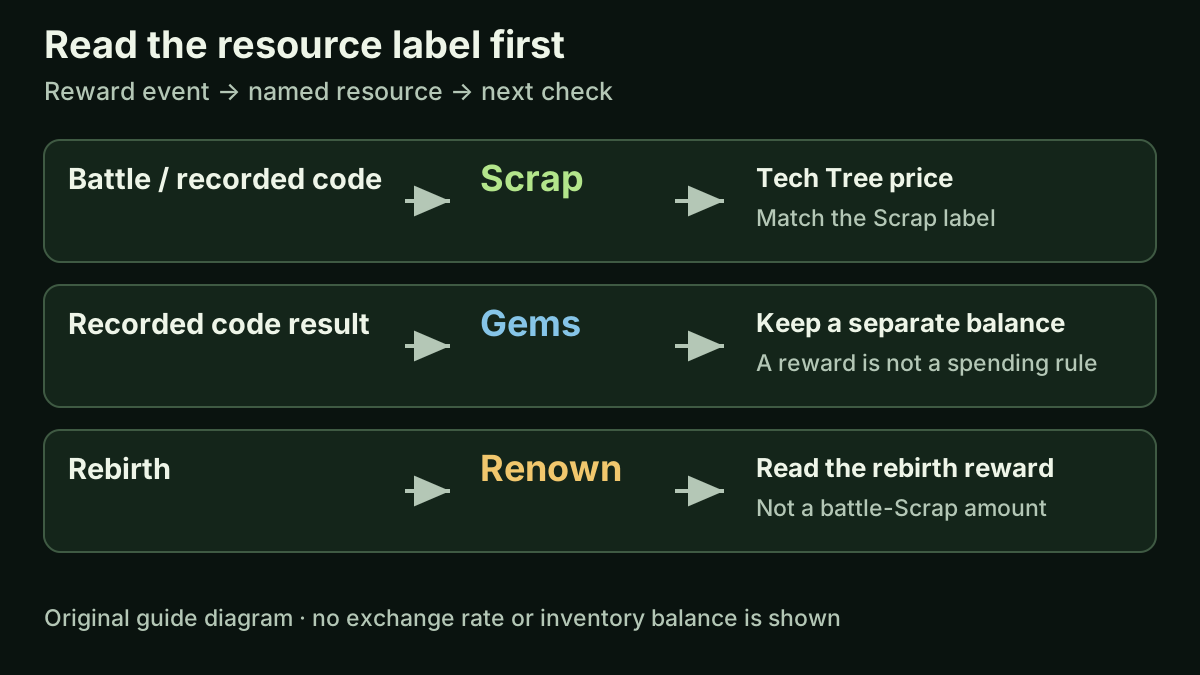
Original resource-reading diagram. It maps documented reward sources to named labels; it is not an inventory screenshot or an exchange-rate chart.
Match each label to the evidence
The official VIP and Renown Boost descriptions were rechecked on October 15. They identify different reward events: battles for Scrap and rebirths for Renown. The historical video adds concrete examples of Scrap and Gems appearing together in a code result.
| Resource | Documented source | What you can use the evidence to check |
|---|---|---|
| Scrap | Battles; some recorded code rewards | Sentry and Howitzer upgrade panels show Scrap prices. Read the current node before buying. |
| Gems | The recorded BIGCODE, GIBILOSTHISSCRAP and IMAGEISAWESOME messages | Keep the Gems amount in its own balance column. These scenes do not show a Gems purchase. |
| Renown | Rebirth; the Renown Boost offer changes that reward | Match the rebirth reward label before applying a Renown percentage. |
Read the battle total without turning kills into currency
Creator recording published September 28, 2026 (UTC); selected scenes reviewed October 3, with the saved 6:02 frame rechecked October 15. This report is a dated example, not a current payout test.
The YouTube player connects to Google when loaded. Your analytics choice does not control YouTube.
At 6:02 in Random Roblox Games R US’s September 28 recording, the level 1.1 report shows Kills (1.94K) on the left and 23 in its amount column. The next line, Stipend, shows 8; Total shows 31. The useful calculation is 23 + 8 = 31. The displayed kill count is not the amount in the reward column.
Use that layout to read one report at a time. In this frame, 1.94K describes kills, 31 is the displayed total, and 0:34 is the time for this battle. These numbers are not interchangeable. The frame does not provide a general payout per kill, and its battle time does not include all earlier attempts.
A separate Level finished row shows +1 beside a different icon. Its resource name is not readable here, so it is kept separate from the 31 total. When reading your own result, confirm the resource label or tooltip before transferring an icon’s amount into a named balance.
| Report field at 6:02 | Displayed value | Reading |
|---|---|---|
| Kills (1.94K) | 23 in the amount column | The count and the reward entry are different fields. |
| Stipend | 8 | Added to the 23 entry in this report. |
| Total | 31 | 23 + 8 = 31; not 1.94K. |
| Level finished | +1 beside another icon | Separate entry; its resource is not identified here. |
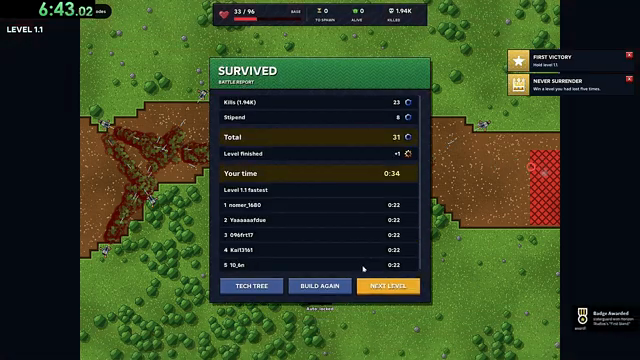
Historical creator-video frame at 6:02. Read the battle-report rows and amount column; the small resource icons are not relabelled by this guide.
Can a failed attempt still give Scrap? Read this recorded example
The first failed attempt in the September 28 recording still has a reward entry. At 0:48, the tutorial says kills earn Scrap to spend in the Tech Tree after battle. At 0:51, the base is at 0/72 and the report says LOST, but Kills (110) has an amount of 2 and Total also shows 2. A loss label therefore does not mean a zero reward in this observed attempt.
The later Sentry tree frames show how a small balance can support a concrete next step. At 1:26 the Scrap balance is 2. At 1:27 it is 1 and Firepower I is at 1/5; at 1:29 the balance is 0 and Extra Sentry I is also at 1/3. Their first purchases each cost 1 Scrap in this recording. The next price for each becomes 3, so the initial two-Scrap balance would not cover buying the same branch twice at those displayed prices.
After your own loss, read the reward total and then the live balance before choosing an affordable change. This sequence illustrates progress after one failed attempt. It does not establish a minimum reward for every loss, a repeatable farming rate or a winning upgrade order.
| Recorded moment | Visible result | Useful reading |
|---|---|---|
| 0:51 · failed battle | Kills (110): 2; Total: 2 | The kill count and reward amount remain separate. |
| 1:26 · Sentry tree | 2 Scrap available | Read the balance before spending. |
| 1:27 · Firepower I | 1/5; balance 1; next price 3 Scrap | One purchase does not keep the original one-Scrap price. |
| 1:29 · Extra Sentry I | 1/3; balance 0; next price 3 Scrap | The two first purchases used the displayed two-Scrap balance. |
A mixed code result still needs separate labels
At 1:50–1:55 in CHALLS’s September 30 recording, BIGCODE’s new result lists a one-hour booster, 2 Scrap and 2 Gems. Keep those as three entries: a duration and two named resource amounts. The message does not say 2,000 Scrap, and 2 Scrap plus 2 Gems is not “4 Scrap.” The booster guide explains the time display separately.
Match the cost label before subtracting
The recorded Sentry Firepower I panel changes from 0/5 to 1/5 after a purchase, while its next Scrap price changes from 1 to 3. The fraction counts node purchases; use the labelled price to check affordability.
Suppose you begin with 10 Scrap and make those two purchases at the recorded prices. The first leaves 9; the second leaves 6. This exercise uses historical prices and does not change a separate Gems balance.
The recorded Howitzer unlock shows 1 bronze, while several later upgrades cost Scrap. Having Scrap alone does not establish that you can pay a price labelled bronze.
Choose the reward question before comparing bonuses
For a battle-Scrap question, read the VIP benefit: it advertises 20% more battle Scrap. For a rebirth-Renown question, read Renown Boost: it advertises 25% more Renown per rebirth. These percentages apply to different named rewards, so comparing 25 with 20 does not establish which offer helps your current activity.
Record the reward event, resource and amount. Put the next purchase’s resource and cost beside them to check whether that named balance covers that price.
A reward message and your balance disagree: reconstruct one transaction
A reward message tells you what that message reports. A balance comparison tells you what changed in the account display. To connect the two, keep the interval small: note the starting balance, perform one action, and read the same resource again before buying an upgrade or starting another battle.
For an illustrative ledger, start with 10 Scrap and 7 Gems. Suppose a fresh message reports the historical BIGCODE amounts of 2 Scrap and 2 Gems, and suppose both are actually credited. The expected balances would be 12 Scrap and 9 Gems. A later one-Scrap purchase would leave 11 Scrap and still 9 Gems. The arithmetic is hypothetical; it is not a new redemption test or proof that BIGCODE works today.
This is why checking only the last balance can hide a credited reward: the later purchase has already changed the number again. Keep the recorded booster duration in a separate field; an hour is not a balance entry. Likewise, the Killed counter from a battle is not a resource credit.
If the observed balance still differs after isolating the action, record the exact message, the before-and-after values, and whether the display updated. Do not silently replace the observation with the expected number. An old result message, another purchase or an unobserved credit are possible explanations to investigate, not a diagnosis. A clear two-screen comparison is more useful than posting an isolated code screenshot.
| Illustrative event | Scrap | Gems | Booster field |
|---|---|---|---|
| Starting balance | 10 | 7 | Record separately |
| Suppose +2 Scrap and +2 Gems are credited | 12 | 9 | One-hour duration is a separate entry |
| Then spend 1 Scrap on an upgrade | 11 | 9 | No timer change established by this calculation |
What this reference covers
The reviewed scenes do not establish a Gems spending route, Renown spending rules, an exchange between resources or the fastest farm. They also do not check actual inventory changes after each code. Use current in-game labels for a purchase and the Codes page for dated reward reports; this guide explains how to keep those labels straight.
Why two battle reports do not give a universal Scrap-per-kill rate
The recording contains two useful reports with very different kill totals. The opening loss at 0:51 shows 110 kills and a reward entry of 2. The later survival at 6:02 shows Kills (1.94K) with 23 in its reward column, plus a separate Stipend of 8 for a total of 31. Comparing the reports helps identify why a simple per-kill prediction is unreliable.
For a deliberately naive calculation, divide 2 by 110, then multiply by 1,940 as if the later compact label were an exact count. The result is about 35.27. That does not reproduce the later kill-reward entry of 23. Dividing the whole total of 31 by the kill count would introduce a different problem: the total includes the separately labelled Stipend.
This comparison does not reveal the game's reward formula. The attempts occur at different points in the recording, and the later kill display is abbreviated. We have not isolated rounding, bonuses, reward rules or intervening progression. The useful conclusion is narrower: scaling that first report's ratio is not a demonstrated way to predict another report.
When planning an upgrade, use the Scrap balance you actually have and the current node's price. When comparing rewards during ordinary play, record the level, result, named reward rows and active benefits for each attempt. Keep the kill count in its own column and separate any stipend or completion reward. Several well-labelled observations are more informative than treating a compact kill label as a currency conversion rate.
| Recorded report | Kill-reward entry | Other visible reward entry |
|---|---|---|
| 0:51: 110 kills | 2; Total 2 | No stipend added in this displayed total |
| 6:02: 1.94K kills | 23 | Stipend 8; Total 31 |
Sources & limitations
Source dates are listed below. Developer descriptions can change during Alpha. These reference notes are not a report of an independent playtest.
- Renown Boost — official Roblox pass Checked 2026-10-12. Earn 25% more Renown every time you rebirth.
- VIP — official Roblox pass Checked 2026-10-12. 20% more scrap from every battle, a VIP tag in chat and the exclusive Sovereign tower skin.
- CHALLS — Horde Defenders video guide Checked 2026-10-01. Third-party recording. Reviewed the first 3:21 for the main-menu Codes entry and five visible redemption-result changes. PART1 is only seen entered in that reviewed excerpt. This is recorded UI evidence, not a redemption test by this wiki or a guarantee that a code works now.
- Random Roblox Games R US — recorded tutorial and tower panels Checked 2026-10-03. Selected level 1.1 tutorial, battle-result and Sentry/Howitzer panel scenes. The description links the exact Roblox experience. This recording predates the September 29 game update; it is not an independent current-build playtest, a complete upgrade catalogue or a guaranteed winning build.
- Horde Defenders — official pass records, October 15 Checked 2026-10-15. Ten official pass records, nine for sale. Prices, named benefits and descriptions are unchanged from October 14. The eight-benefit bundle still carries its next-update notice. Public prices are not personalized checkout quotes or proof of delivery.
- Random Roblox Games R US — saved battle and desktop-tree frames reread October 20 Checked 2026-10-20. Saved frames actually viewed on October 20: To spawn / Alive / Killed and base health at 0:18 and 0:48; tutorial Scrap wording at 0:48; LOST reward entries at 0:51; desktop tree controls, Scrap balances and Sentry counters at 1:26, 1:27 and 1:29. This is a historical frame review, not a current game test, full-video review or new reward formula. The same 1:26 and 1:27 tooltips visibly give +0.48 shots per second for Rate of Fire I and +0.16 damage per bullet for Firepower I; the calculator is editorial arithmetic, not measured DPS.