Find the tower unlock before budgeting for its upgrades
The recorded Howitzer description says it launches shells that explode on landing and damage enemies in the blast. To read its Tech Tree, separate the node that grants the tower from the nodes that change its shells, firing frequency or placement allowance.
Random Roblox Games R US’s September 28 recording shows a Howitzer Tower unlock costing 1 bronze. The later 28-Scrap entries are upgrade prices; they are not the tower’s unlock price. A “Back to 1.3” button is navigation, not evidence that clearing level 1.3 grants Howitzer. Select the current unlock node and read any prerequisite shown there before planning a purchase.
- 01
Locate Howitzer Tower
Use the named tower-unlock node rather than a branch called Shell Power or Blast Radius.
- 02
Read the resource beside the cost
The recording distinguishes bronze for the unlock from Scrap for several upgrades. Use the resource actually shown in your own panel.
- 03
Check access before comparing improvements
Once the tower is available, inspect its separate upgrade effects. The reviewed footage does not provide the complete prerequisite chain or a bronze-acquisition route.
Separate a blast’s damage from the fragments it creates
The recorded Howitzer has a landing blast and a separate Fragmenting Shells option. Keep the unit in each tooltip attached to its number. Shell Power adds blast damage; Fragmenting Shells adds fragments per shell. A fragment count is not another way to write damage.
The 14:15 panel shows +4 fragments per shell. That does not establish “four extra damage,” four hits on each bug, or a total of five hits when combined with the initial explosion. To calculate damage from fragments, you would also need their damage and which targets they actually hit. Those values and collision results are not supplied by the reviewed panel.
Treat an increment as a change to the named quantity, too. The +1 on Extra Howitzer changes how many towers may be placed, while the +1 on Shell Power refers to blast damage. They share a numeral but cannot be substituted in a damage comparison. The permitted extra tower still needs its own position and target.
Choose the effect according to the problem you can observe. Reconsider aim when the landing point misses the intended group; inspect radius for coverage, Shell Power for stated blast damage, and Rate of Fire for launch frequency. The fragment tooltip adds another mechanism to inspect, rather than providing enough information to rank it against all those branches.
| Recorded quantity | Read the increment as | Do not turn it into |
|---|---|---|
| +1 blast damage | Change to the named blast-damage value | A wider blast or an extra tower |
| +3 blast radius | Change to the radius value; no unit named | Three damage or a threefold hit count |
| +4 fragments per shell | Additional fragments described for each shell | Four guaranteed hits per enemy |
| +1 Howitzer you may place | Change to placement allowance | One damage added to each existing tower |
Compare the recorded first-purchase panels
The table transcribes the reviewed September 28 panels. At 14:12 the Blast Radius tooltip shows +3 radius, a 0/10 purchase counter and a 28-Scrap price. It does not name a distance unit, so the +3 should not be described as meters or studs. These are initial recorded costs, not a current price list or the total cost of finishing each branch.
| Recorded upgrade | What one purchase changes | Recorded first price |
|---|---|---|
| Shell Power I | +1 blast damage | 28 Scrap |
| Blast Radius | +3 blast radius; unit not stated | 28 Scrap |
| Rate of Fire | +0.19 shells per second | 28 Scrap |
| Extra Howitzer I | +1 Howitzer you may place | 28 Scrap |
| Fragmenting Shells | +4 fragments per shell | 1 gold |
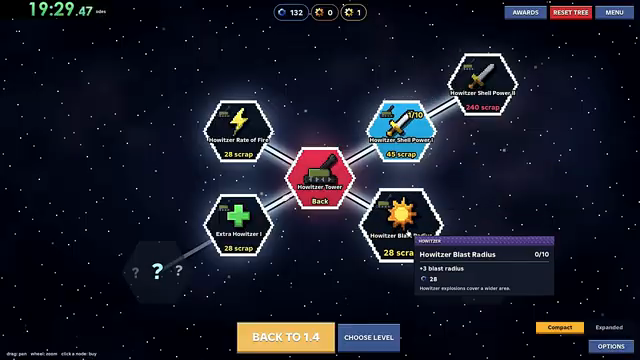
Blast Radius at 14:12 in the September 28 recording. Read the tooltip’s effect separately from its counter and cost.
The same starting price can lead to different next prices
At 14:15 in the September 28 recording, the displayed Scrap balance is 48. The four Howitzer branches below have each received one purchase, but their next prices differ. Their shared initial 28-Scrap price does not make later purchases equally expensive.
Read each current price against the balance separately. Either 45-Scrap choice would leave 3 from the displayed 48; buying both would cost 90, which that balance does not cover. The 53-Scrap option is 5 short and the 56-Scrap option is 8 short. These are comparisons of visible numbers, not a recommendation to buy whichever is affordable. Decide which effect you need, then recheck its counter, resource and next price. Do not reuse one branch’s price for another or extend this snapshot into a formula for later ranks.
| Recorded branch at 14:15 | Purchase counter | Next price |
|---|---|---|
| Howitzer Shell Power I | 1/10 | 45 Scrap |
| Howitzer Blast Radius | 1/10 | 45 Scrap |
| Howitzer Rate of Fire | 1/5 | 53 Scrap |
| Extra Howitzer I | 1/3 | 56 Scrap |
More shells per second does not mean subtracting seconds from the timer
The recorded Howitzer Rate of Fire increment is +0.19 shells per second. That is an increase in a rate, not a reduction of 0.19 seconds from the time between launches. To translate a steady rate into an average interval, divide one second by the number of shells per second.
Consider two invented starting rates. At 0.50 shells per second, the average interval is 2.00 seconds. Adding 0.19 gives 0.69 shells per second, or about 1.45 seconds per shell. At 1.00 shell per second, the same increment gives 1.19, or about 0.84 seconds per shell. The same absolute rate increase changes these two intervals by different amounts.
This calculation helps decode a tooltip. It does not tell you when the next shell will launch after pressing Start Battle, how long it travels, or when it lands. A launch interval and flight time are separate quantities. The reviewed panels do not establish the first-shot delay, animation timing or how the engine handles fractional rates.
If your practical problem is a group crossing the target between explosions, first watch whether shells are landing in the intended area. Then read the current firing-rate node and compare its price with other changes. Faster launches cannot, by arithmetic alone, prove that a shot will hit a moving group or that this upgrade should come before Blast Radius.
| Invented starting rate | Starting interval | After +0.19 shells/second | New average interval |
|---|---|---|---|
| 0.50 shells/second | 2.00 seconds | 0.69 shells/second | About 1.45 seconds |
| 1.00 shell/second | 1.00 second | 1.19 shells/second | About 0.84 seconds |
Before retrying, describe the change you actually need
When a blast lands away from the intended group, inspect the aim point first. When comparing two upgrade nodes, write down their exact effects and next costs instead of treating a larger displayed number as a better purchase. Extra radius, more frequent shells and more fragments are not interchangeable units.
For a badge attempt, check the permitted towers before experimenting. Fire and Lightning names Flamers and Tesla coils, so Howitzer does not fit its tower list. One Gun Wonder permits a single tower, meaning that an extra-Howitzer allowance does not authorize a second placement during that attempt.
Blast radius is not blast damage: a circle-area example
The reviewed Howitzer tooltip separates Blast Radius from Shell Power. The former adds 3 to the displayed radius value; the latter adds blast damage. The radius tooltip does not name a distance unit. Do not label its value as studs or meters, and do not read a wider blast as an equal percentage increase in damage.
For an invented circular footprint with radius 4 units, adding 3 changes the radius to 7. The radius is 75% larger, while the geometric area changes by (7 ÷ 4)² = 3.0625: about 3.06 times the original area. This calculation illustrates how radius and area differ. Four is not a claimed Howitzer starting radius, and the model does not establish the game’s exact hit shape.
The number of bugs actually hit depends on where they are when the shell arrives. A larger drawn area can include empty terrain. If the same group already fits inside the smaller footprint, extra area alone does not establish a higher per-enemy damage value. If enemies are outside it, aim and coverage become the relevant questions.
Before spending, inspect the intended landing point, the group’s spread and the current node text. Compare Shell Power when the question is damage per blast; compare radius when the question is coverage. The historical panels supply the effects, but no universal purchase order or measured damage-per-Scrap result.
| Quantity in the invented example | Before | After | Meaning |
|---|---|---|---|
| Radius | 4 | 7 | 75% larger distance from center to edge. |
| Diameter | 8 | 14 | Also 75% larger; it is twice the radius. |
| Circular area | 16π | 49π | About 3.06 times as much geometric area. |
| Damage per enemy | Not specified | Not specified | Cannot be calculated from the footprint alone. |
Watch the unlock and the individual shell panels
Creator recording published September 28, 2026 (UTC); selected Howitzer scenes reviewed October 3. The video is historical evidence, not a current-build unlock test or a guaranteed winning layout.
The YouTube player connects to Google when loaded. Your analytics choice does not control YouTube.
Sources & limitations
Source dates are listed below. Developer descriptions can change during Alpha. These reference notes are not a report of an independent playtest.
- One Gun Wonder — official Roblox badge Checked 2026-10-12. Survive level 1.1 with a single tower and no abilities.
- Fire and Lightning — official Roblox badge Checked 2026-10-12. Survive level 4.1 with only Flamers and Tesla coils, and no ability but the Cryo beam
- Random Roblox Games R US — recorded tutorial and tower panels Checked 2026-10-03. Selected level 1.1 tutorial, battle-result and Sentry/Howitzer panel scenes. The description links the exact Roblox experience. This recording predates the September 29 game update; it is not an independent current-build playtest, a complete upgrade catalogue or a guaranteed winning build.
- Random Roblox Games R US — saved interface frames reread October 19 Checked 2026-10-19. Saved September 28 video frames were reread: target and removal labels at 0:26–0:34; Sentry unlock tooltip at 0:57 and separate branch panels at 1:25–1:28; loss/survival action labels at 0:51, 6:02 and 8:14; Howitzer balance and next-price comparison at 14:15. These are historical interface observations, not an independent playtest or a current-build test.
- Random Roblox Games R US — later result and fragment-panel review, November 12 Checked 2026-11-12. Visually reread the saved Level 1.2 frame, existing Howitzer radius image, 14:15 Fragmenting Shells frame, and newly extracted 16:42 / 18:18 results. The later results show Level 1.4 Survived with 108/108 health, rewards 110 + 12 + 20 = 142, Flawless +1 and time 0:59; Level 1.5 Survived with 103/108 health, rewards 110 + 12 + 40 = 162, Level finished +1 and time 1:11. The fragment panel shows +4 fragments per shell. This is selected historical footage, not a current playtest or a complete reward formula.