Start with the problem your next upgrade should solve
Sentry is the machine-gun tower in the recorded opening tutorial. Its bullets travel toward the aim point you choose. Before spending Scrap, check whether that aim covers the route: an upgrade can change a tower’s output or placement allowance, but it does not move an off-path target onto the road.
For the three documented first-tier choices, separate damage per bullet, shots per second and the number of Sentries you may place. The diagram is an explanation of those different effects, not a recommended purchase order. The panel values below come from Random Roblox Games R US’s September 28, 2026 recording; compare them with your current Tech Tree.
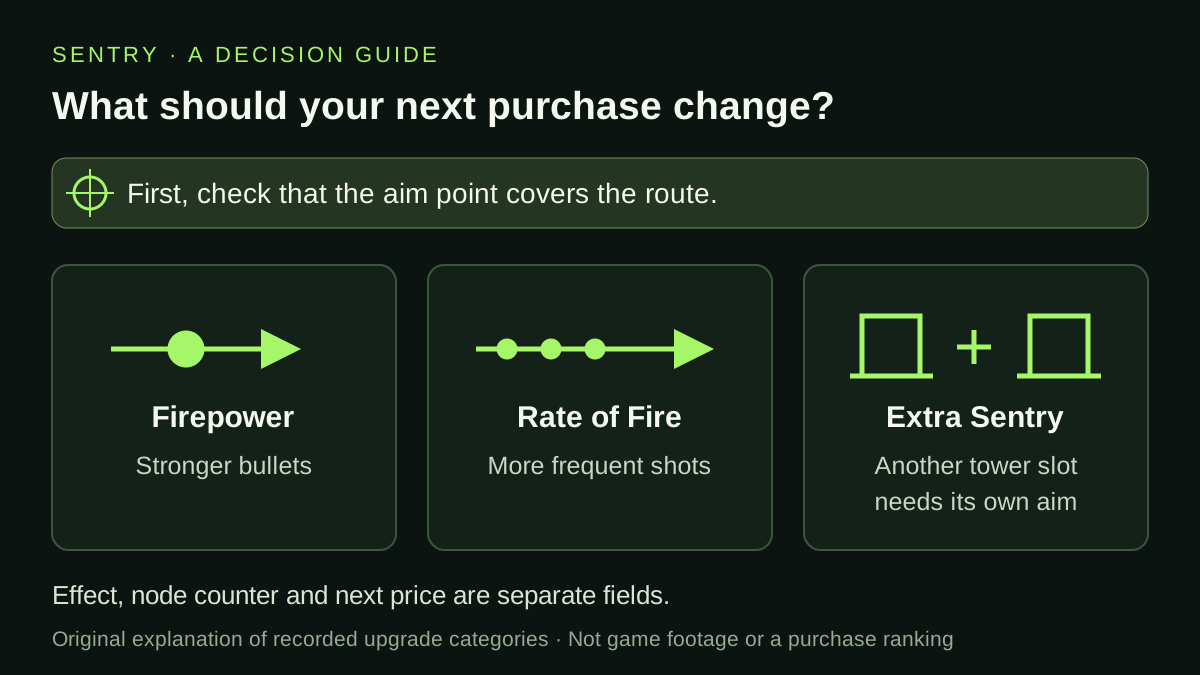
Original guide diagram. These are three different upgrade effects; the drawing is not a game screenshot or an efficiency ranking.
Read the effect, purchase count and next price separately
In the reviewed recording, each of these nodes starts at 1 Scrap. Firepower I adds 0.16 damage per bullet, Rate of Fire I adds 0.48 shots per second, and Extra Sentry I increases the placement allowance by one. Those quantities have different units; comparing 0.16 with 0.48 alone does not tell you which purchase gives more useful damage.
Firepower I changes from 0/5 to 1/5 after a purchase. That fraction records purchases into this node, not towers built in the battle. Extra Sentry I has its own 0/3 counter and an explicit placement effect. After one purchase, the recorded next price for both Firepower I and Extra Sentry I becomes 3 Scrap. Do not multiply the initial price by the counter maximum to estimate the whole branch.
| Recorded node | Effect of one purchase | First price in the recording |
|---|---|---|
| Firepower I | +0.16 damage per bullet | 1 Scrap |
| Rate of Fire I | +0.48 shots per second | 1 Scrap |
| Extra Sentry I | +1 Sentry you may place | 1 Scrap |
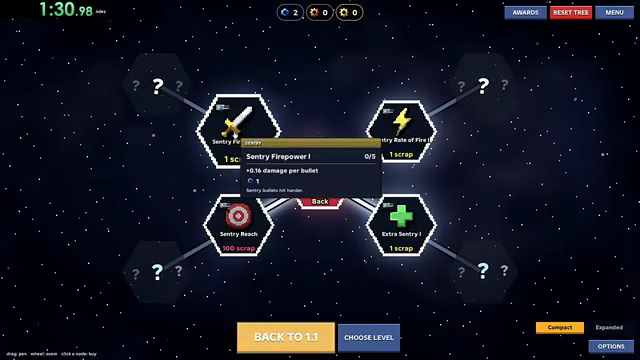
The Firepower I tooltip at 1:26 shows its effect, 0/5 counter and first purchase cost. This is dated creator footage, not a current-build price check.
An unlocked Sentry is not the same as completed upgrade branches
At 0:57, the Sentry Tower tooltip says Unlock, shows 1/1 and displays Fully upgraded. Read that message with the selected node’s name. It describes the displayed unlock node; it does not show that every Sentry improvement is complete.
The separate Sentry view at 1:25 contains Firepower I, Rate of Fire I, Reach I and Extra Sentry I around the central Sentry Tower / Back node. Subsequent panels show their own effects, counters and prices. For example, the Firepower I panel at 1:27 still shows 1/5 after the first purchase, while Extra Sentry I at 1:28 shows 0/3. If you are looking for stronger bullets or another permitted placement, inspect that named branch instead of stopping at the unlock tooltip’s Fully upgraded message. These are two views of the September 28 tree; the screenshots do not supply a complete current prerequisite map.
Use a symptom check before buying
Choose one change you want to inspect on the next attempt. A second tower adds a placement and aiming decision; it is not the same action as making the first tower fire faster. If you change several things at once, a different result will be harder to attribute to one purchase.
| What you observe | Useful next check | Keep separate |
|---|---|---|
| Bullets are directed away from the route | Select the tower and adjust its aim point. | Positioning and purchased stats. |
| The aim is useful and you are comparing attack upgrades | Read damage per bullet and shots per second beside their current costs. | Two different effects, with no tested best-first order here. |
| You want to cover another approach | Check the Extra Sentry allowance, then plan another position and target. | Permission to place a tower and actually placing it. |
| You are attempting One Gun Wonder | Keep the official single-tower and no-abilities conditions in view. | An available extra-tower slot does not waive the badge restriction. |
Compare damage and fire rate with your own numbers
The recorded first Sentry tooltips use different units: Firepower I adds 0.16 damage per bullet, while Rate of Fire I adds 0.48 shots per second. A larger number does not by itself mean a larger increase in damage over time. The starting damage and firing rate matter too.
This calculator compares the ideal product of damage per shot and shots per second. Enter your current damage and rate, then the increments shown by the two nodes you are considering. The starting 1-damage and 1-shot-per-second values are invented examples; the 0.16 and 0.48 increments come from the September 28 recording. Replace all four values when your current display differs.
For damage D and rate R, the starting product is D × R. Adding damage increases it by the damage increment × R; adding fire rate increases it by D × the rate increment. The table shows why the same two increments can produce different comparisons. It assumes every shot hits for the entered damage and all other conditions stay the same.
| Illustrative starting values | Gain from +0.16 damage | Gain from +0.48 shots/second |
|---|---|---|
| D = 1; R = 1 | 0.16 × 1 = 0.16 | 1 × 0.48 = 0.48 |
| D = 1; R = 3 | 0.16 × 3 = 0.48 | 1 × 0.48 = 0.48 |
| D = 1; R = 4 | 0.16 × 4 = 0.64 | 1 × 0.48 = 0.48 |
A mathematical comparison, not measured DPS
This model excludes missed shots, time without a target, overkill, enemy defenses and other combat effects. It also excludes upgrade prices. Compare the current costs separately; a larger ideal gain does not establish a better purchase or a winning build.
Starting damage and rate are illustrative. The increments come from recorded September 28 tooltips. Replace all four numbers with your current values. No inputs are saved or sent.
Add the next price to the damage-versus-fire-rate comparison
When two Sentry upgrades have different prices, compare the extra ideal output per Scrap as well as the total increase. The calculation above deliberately leaves price out. A more expensive improvement may add more output in one purchase while adding less for each Scrap spent.
Use D for your current damage per bullet and R for shots per second. Divide the damage upgrade’s gain, ΔD × R, by its displayed Scrap price. For the firing-rate option, divide D × ΔR by that option’s own price. Only compare prices expressed in the same resource; a cost in another resource cannot be put into a Scrap denominator without a supported exchange rate.
The exercise below invents starting stats and prices to isolate the decision. It uses the historical +0.16 damage and +0.48 shots-per-second increments from the September 28 recording. It does not describe a current Sentry save. With D = 1 and R = 3, either increment adds 0.48 to the ideal damage-per-second product. At different prices, however, their gain per Scrap differs.
After any purchase, read both stats and prices again. Raising damage changes the benefit of a later fire-rate purchase; raising fire rate changes the benefit of a later damage purchase. A single comparison cannot rank a whole branch. Accuracy, target coverage and time without enemies still matter, so treat this as a budgeting aid after fixing aim, not measured combat efficiency.
| Illustrative option at D = 1, R = 3 | Extra ideal output | Invented price | Extra output per Scrap |
|---|---|---|---|
| +0.16 damage | 0.16 × 3 = 0.48 | 1 Scrap | 0.48 |
| +0.48 shots/second | 1 × 0.48 = 0.48 | 3 Scrap | 0.16 |
Replace the invented inputs
The starting stats and 1-versus-3 prices are an editorial example. Read your current node costs and increments before using the comparison.
Correct the target before choosing a removal button
At 0:26, the recorded tutorial asks the player to tap the placed Sentry and drag its target onto the white dot on the path. The same screen shows two buttons: REMOVE and REMOVE ALL SENTRY. The second label explicitly refers to all Sentries; it is worth reading the full label before using a removal control.
For the off-path warning at 0:34, follow the target correction first: select the tower and drag the target onto the marked road. If the tower itself needs replacing, the desktop prompt also mentions right-clicking it to remove and place it again. Those instructions concern different objects: moving the target changes aim, while a removal action concerns a placed defense. This September 28 recording does not establish removal refunds, effects on other tower types or the controls used on every device. Follow the controls shown in your current game.
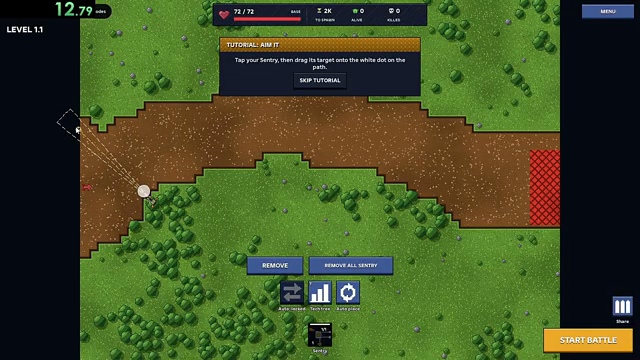
At 0:26, the target-adjustment prompt and the REMOVE / REMOVE ALL SENTRY labels are visible together. Historical creator footage; this saved frame was reread on October 19.
Watch the description and the first purchases
Creator recording published September 28, 2026 (UTC); these selected scenes were reviewed for the wiki on October 3. Values are historical examples, not a wiki playtest.
The YouTube player connects to Google when loaded. Your analytics choice does not control YouTube.
Start with the Sentry description, then compare the cursor’s selected node with the tooltip beside it. Pause before and after a purchase to see which counter and price change. The chapters lead to the recorded panels rather than implying that the whole video is a single successful build.
If your current panel differs, use its displayed effect and price for your decision. This reference explains how to read the recorded choices; it does not establish a complete Sentry upgrade tree, a damage-per-Scrap ranking or the best setup for every level.
Buying damage and fire rate together changes the second comparison
If you plan one Firepower purchase and one Rate of Fire purchase, calculate the final pair of stats. Adding the two gains measured against the original tower misses the fact that the faster rate also fires the stronger bullets. This is an arithmetic consequence of the ideal damage-times-rate model, not a claim about actual hits.
Start with invented values of 1 damage per bullet and 1 shot per second. Use the historical increments shown in the September 28 panels: +0.16 damage and +0.48 shots per second. Damage alone changes the product to 1.16; rate alone changes it to 1.48. Taking both changes it to 1.16 × 1.48 = 1.7168. The combined increase is 0.7168, rather than the 0.64 obtained by adding 0.16 and 0.48 against the unchanged starting stats.
The additional 0.0768 is 0.16 × 0.48. In general, the gain from both purchases is ΔD × R + D × ΔR + ΔD × ΔR. You can use the existing calculator twice by entering the new stats after the first purchase. Read the actual next price again as well: the cost comparison is separate from this product.
If both final increments are fixed, their final mathematical product is the same whichever you apply first. That does not establish an equally useful purchase order in play. You may only afford one before the next battle, the next price may differ, and aim or restricted objectives can matter more than ideal output. Use the final-product check for a planned pair, and the current marginal gain for the single purchase you can make now.
| Illustrative choice | Final ideal product | Increase over 1 |
|---|---|---|
| Damage only | 1.16 × 1 = 1.16 | 0.16 |
| Rate only | 1 × 1.48 = 1.48 | 0.48 |
| Both | 1.16 × 1.48 = 1.7168 | 0.7168 |
Sources & limitations
Source dates are listed below. Developer descriptions can change during Alpha. These reference notes are not a report of an independent playtest.
- One Gun Wonder — official Roblox badge Checked 2026-10-12. Survive level 1.1 with a single tower and no abilities.
- Random Roblox Games R US — recorded tutorial and tower panels Checked 2026-10-03. Selected level 1.1 tutorial, battle-result and Sentry/Howitzer panel scenes. The description links the exact Roblox experience. This recording predates the September 29 game update; it is not an independent current-build playtest, a complete upgrade catalogue or a guaranteed winning build.
- Random Roblox Games R US — saved interface frames reread October 19 Checked 2026-10-19. Saved September 28 video frames were reread: target and removal labels at 0:26–0:34; Sentry unlock tooltip at 0:57 and separate branch panels at 1:25–1:28; loss/survival action labels at 0:51, 6:02 and 8:14; Howitzer balance and next-price comparison at 14:15. These are historical interface observations, not an independent playtest or a current-build test.
- Random Roblox Games R US — saved battle and desktop-tree frames reread October 20 Checked 2026-10-20. Saved frames actually viewed on October 20: To spawn / Alive / Killed and base health at 0:18 and 0:48; tutorial Scrap wording at 0:48; LOST reward entries at 0:51; desktop tree controls, Scrap balances and Sentry counters at 1:26, 1:27 and 1:29. This is a historical frame review, not a current game test, full-video review or new reward formula. The same 1:26 and 1:27 tooltips visibly give +0.48 shots per second for Rate of Fire I and +0.16 damage per bullet for Firepower I; the calculator is editorial arithmetic, not measured DPS.