A recorded ordinary survival already offers Next Level
You do not need to read every imperfect result as a failed clear. At 6:02 in Random Roblox Games R US’s September 28 recording, the level 1.1 report says Survived, shows 33/96 base health and offers Next Level. A later attempt at 8:14 shows a Flawless reward with 108/108 health. The video then moves to level 1.2.
These are two separate attempts with different upgrades. The comparison establishes what those screens show, not a universal reward formula. If your current report differs, read its status and available controls directly instead of expecting the same health totals or payout.
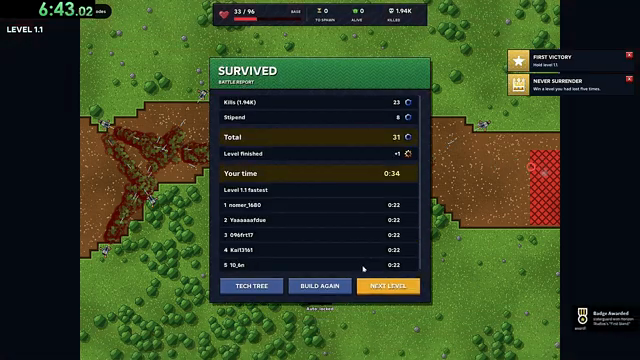
The 6:02 creator-video frame shows Survived, remaining base health and Next Level. It is an example from the September 28 recording.
Keep the status, health and navigation as separate pieces of information
The result label answers how the attempt ended. The health fraction shows the displayed remaining and maximum base health. The navigation button shows an available next action. A time on the battle report describes that battle; it is not a timer for all the retries shown earlier in the video.
The later full-health result is useful to compare with the earlier survival, but the changed maximum health also matters. Comparing 33 with 108 alone would ignore that the two attempts have different maximum values. Likewise, different reward numbers would not isolate a Flawless multiplier when upgrades and other conditions have also changed.
| Video scene | Visible result | What it helps answer |
|---|---|---|
| 6:02 · level 1.1 | Survived; 33/96 base health; Next Level available | Ordinary survival offers progression in this recorded example. |
| 8:14 · later level 1.1 attempt | Flawless reward; 108/108 base health | The later attempt ends at full displayed health. |
| 8:20 · transition | Level 1.2 | The recording proceeds into the next level. |
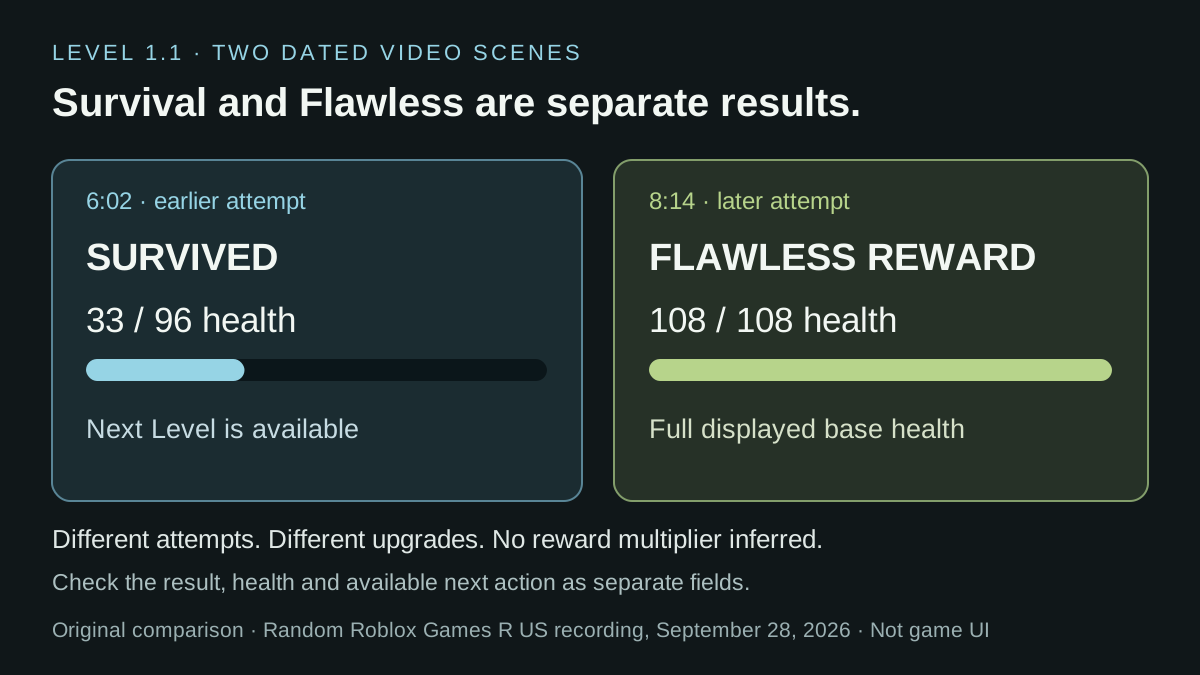
Original comparison card transcribing selected fields from two dated video scenes. It is not a screenshot, a live result or a reward calculator.
Compare health fractions when the maximum has changed
The two recorded level 1.1 results have different maximum health: 33/96 at 6:02 and 108/108 at 8:14. To describe the remaining share, divide the first number by the second. The earlier frame has about 34.4% of its displayed maximum left; the later frame has 100%. Keep those percentages beside the original fractions so readers can reconstruct the calculation.
This prevents a larger health number from looking automatically better. In an invented comparison, 90/120 is 75% remaining, while 80/100 is 80%. The first result has more health points left, but the second retains a larger share of its own maximum. Which is useful depends on the question you are asking; neither value alone explains the tower setup or the reason a defense leaked.
Do not call maximum minus final health the total damage taken unless you know the health history. A final fraction by itself does not show the starting value, mid-run changes or any recovery. It is safest to describe what the result actually displays: remaining health and displayed maximum.
For a comparison between retries, record those two fields, the level and the changed upgrade or target. The historical full-health result is also a different attempt with different upgrades, so the percentage calculation cannot isolate what caused the improvement or establish a Flawless reward formula. Continue to use the actual result label for the clear and the separate badge check for an achievement.
| Result or example | Health fraction | Remaining share |
|---|---|---|
| Recorded 6:02 result | 33/96 | About 34.4% |
| Recorded 8:14 result | 108/108 | 100% |
| Invented comparison A | 90/120 | 75% |
| Invented comparison B | 80/100 | 80% |
Choose an action from the result screen
The recorded reports offer different controls after a loss and after survival. At 0:51, the LOST panel shows RETRY and TECH TREE. At 6:02, the SURVIVED report shows TECH TREE, BUILD AGAIN and NEXT LEVEL; the later full-health report at 8:14 shows those same three labels.
Choose the purpose of your next action before leaving the report. If you want to inspect an upgrade, use the Tech Tree entry. If you want another attempt at the present level, look for Retry or Build Again on the displayed result. If you want to progress, look for Next Level. The later sequence reaches Level 1.2 at 8:20. The button labels do not establish which placements or targets a replay preserves, so inspect the setup before starting again. This comparison records the September 28 interface and does not promise identical controls on every current screen.
Choose the next objective before replaying
An ordinary campaign clear, a full-health result and a restricted badge are different goals. First Stand’s official condition is to survive level 1.1. One Gun Wonder adds a single-tower limit and prohibits abilities. A result can therefore help you progress without proving that you followed a particular badge restriction.
For another level, check its own badge wording rather than transferring the level 1.1 rules. Holding Ground asks for survival on level 3.1, while Specialist on the same level allows only one tower type and no abilities. The objective determines which changes are sensible before the next run.
| Your next goal | Useful next action | Do not assume |
|---|---|---|
| Continue the campaign | Use the next-level option when your current result offers it. | That every ordinary clear requires a Flawless result. |
| Compare an ordinary retry | Inspect the health result, aim and current upgrade choices; change one decision you can explain. | That the video supplies a guaranteed full-health build. |
| Attempt One Gun Wonder | Plan one tower and no abilities on level 1.1. | That surviving with extra towers satisfies the badge. |
| Diagnose a missing badge | Compare the entire attempt with its published restrictions. | That a survival label alone verifies every hidden award condition. |
A faster battle is not always a faster replay cycle
Use the timer that matches your question. The reviewed 6:02 result frame displays 0:34 for that battle. That value does not include every earlier failed attempt, time spent selecting upgrades or the time taken to prepare another run. A video’s chapter timestamp is a third clock: it locates a scene in the upload.
If you are comparing the time needed to repeat a level, measure from a consistent starting point through preparation, the battle and the return to that same starting point. Keep failed attempts in the total if they are part of the route you are comparing. Use the battle timer alone only when the question is specifically battle duration.
Illustrative comparison: one setup takes 30 seconds in battle and 40 seconds to prepare and restart, for a 70-second cycle. Another takes 40 seconds in battle and 15 seconds outside it, for a 55-second cycle. The second battle is slower but its complete cycle is 15 seconds shorter. These are invented timings, not a tested Horde Defenders farming strategy.
For an actual comparison, note the level, game-speed setting, upgrades, success/failure result and what your clock includes. The historical full-health and damaged-base results have different upgrades, so neither their video positions nor their final health establishes which setup is faster or earns more per minute. Record the relevant reward separately if that is the question you intend to test.
| Clock | What it measures | Example or limit |
|---|---|---|
| Battle-report timer | The duration shown for that attempt. | 0:34 on the reviewed 6:02 result frame. |
| Replay-cycle timer | Preparation, attempt and return to a defined starting state. | Must be timed consistently by the person making the comparison. |
| YouTube timestamp | Position within the creator’s upload. | 6:02 locates the result scene; it is not the battle duration. |
Watch both result screens, not just the later success
Creator recording published September 28, 2026 (UTC); these selected result scenes were reviewed October 3. They are different attempts with different upgrades, not a wiki playtest or a proven reward comparison.
The YouTube player connects to Google when loaded. Your analytics choice does not control YouTube.
Use the first chapter to inspect the ordinary survival report and its Next Level button. Then jump to the later full-health result. Keeping the scenes separate avoids turning an edited comparison into a claim about one uninterrupted run or one fixed purchase order.
If you share a result for a correction, include the level, result screen and the relevant restrictions you followed. Those details are more useful than a screenshot of only a reward number. The wiki’s badge guide explains the published conditions; this page explains how the recorded result fields differ.
Sources & limitations
Source dates are listed below. Developer descriptions can change during Alpha. These reference notes are not a report of an independent playtest.
- First Stand — official Roblox badge Checked 2026-10-12. Survive level 1.1.
- One Gun Wonder — official Roblox badge Checked 2026-10-12. Survive level 1.1 with a single tower and no abilities.
- Holding Ground — official Roblox badge Checked 2026-10-12. Survive level 3.1.
- Specialist — official Roblox badge Checked 2026-10-12. Survive level 3.1 with only one kind of tower and no abilities.
- Random Roblox Games R US — recorded tutorial and tower panels Checked 2026-10-03. Selected level 1.1 tutorial, battle-result and Sentry/Howitzer panel scenes. The description links the exact Roblox experience. This recording predates the September 29 game update; it is not an independent current-build playtest, a complete upgrade catalogue or a guaranteed winning build.
- Random Roblox Games R US — saved interface frames reread October 19 Checked 2026-10-19. Saved September 28 video frames were reread: target and removal labels at 0:26–0:34; Sentry unlock tooltip at 0:57 and separate branch panels at 1:25–1:28; loss/survival action labels at 0:51, 6:02 and 8:14; Howitzer balance and next-price comparison at 14:15. These are historical interface observations, not an independent playtest or a current-build test.